提示词
社区译文;来源: MCP 80041ab0
模型上下文协议(MCP)为服务器向客户端暴露提示词模板提供了标准化方式。提示词使服务器能够提供用于与语言模型交互的结构化消息和指令。客户端可以发现可用提示词、获取其内容,并通过提供参数对其进行定制。
_meta 请求元数据(io.modelcontextprotocol/protocolVersion、io.modelcontextprotocol/clientInfo 和 io.modelcontextprotocol/clientCapabilities)。每个请求 MUST 包含必需的 _meta 字段;请参阅 _meta
。用户交互模型
提示词被设计为由用户控制,即服务器向客户端暴露提示词,目的是让用户能够明确选择是否使用。这里指的是由谁决定何时使用提示词,而不是由谁编写其内容。提示词内容由服务器定义。
通常,提示词通过用户界面中由用户发起的命令触发,使用户能够自然地发现和调用可用提示词。
例如,将提示词呈现为斜杠命令:
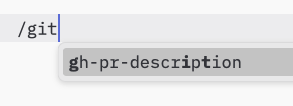
不过,实现者可以通过任何符合自身需求的界面模式暴露提示词;协议本身并不强制规定特定的用户交互模型。
能力
支持提示词的服务器 MUST 声明 prompts 能力,并将其包含在 DiscoverResult(英文)
中:
{
  "capabilities": {
    "prompts": {
      "listChanged": true
    }
  }
}
listChanged 表示服务器是否会在可用提示词列表发生变化时发出通知。
声明 prompts 能力的服务器 MUST 响应 prompts/list 请求,返回当前可供发起请求的客户端使用的提示词集合。该集合 MAY 为空,也 MAY 随时间变化(参见列表变更通知
),但 MUST NOT 因连接不同而变化,也不得因同一连接上的其他请求产生副作用而变化。由于凭据是逐请求输入,而非连接状态,该集合 MAY 根据请求携带的授权而变化,例如只返回调用者获授作用域允许的提示词。
协议消息
列出提示词
客户端通过发送 prompts/list 请求获取可用提示词。此操作支持分页
和缓存
。
请求:
{
  "jsonrpc": "2.0",
  "id": 1,
  "method": "prompts/list",
  "params": {
    "cursor": "optional-cursor-value"
  }
}
响应:
{
  "jsonrpc": "2.0",
  "id": 1,
  "result": {
    "resultType": "complete",
    "prompts": [
      {
        "name": "code_review",
        "title": "Request Code Review",
        "description": "Asks the LLM to analyze code quality and suggest improvements",
        "arguments": [
          {
            "name": "code",
            "description": "The code to review",
            "required": true
          }
        ],
        "icons": [
          {
            "src": "https://example.com/review-icon.svg",
            "mimeType": "image/svg+xml",
            "sizes": ["any"]
          }
        ]
      }
    ],
    "nextCursor": "next-page-cursor",
    "ttlMs": 600000,
    "cacheScope": "public"
  }
}
获取提示词
客户端通过发送 prompts/get 请求获取特定提示词。参数可以通过自动补全 API
自动补全。
请求:
{
  "jsonrpc": "2.0",
  "id": 2,
  "method": "prompts/get",
  "params": {
    "name": "code_review",
    "arguments": {
      "code": "def hello():\n    print('world')"
    }
  }
}
响应:
{
  "jsonrpc": "2.0",
  "id": 2,
  "result": {
    "resultType": "complete",
    "description": "Code review prompt",
    "messages": [
      {
        "role": "user",
        "content": {
          "type": "text",
          "text": "Please review this Python code:\ndef hello():\n    print('world')"
        }
      }
    ]
  }
}
服务器也 MAY 使用 prompts/get 的 InputRequiredResult
响应,表示解析提示词之前需要额外输入。此过程遵循多轮往返请求
机制。重试请求时,客户端在请求参数中包含 inputResponses,并在服务器提供了 requestState 时一并包含该字段。
列表变更通知
当可用提示词列表发生变化时,声明了 listChanged 能力的服务器 SHOULD 向已打开 subscriptions/listen
流并设置 promptsListChanged: true 的客户端发送通知:
{
  "jsonrpc": "2.0",
  "method": "notifications/prompts/list_changed"
}
消息流
  sequenceDiagram
    participant Client
    participant Server

    Note over Client,Server: Discovery
    Client->>Server: prompts/list
    Server-->>Client: List of prompts

    Note over Client,Server: Usage
    Client->>Server: prompts/get
    Server-->>Client: Prompt content

    opt listChanged
      Client->>Server: subscriptions/listen (promptsListChanged: true)
      Server--)Client: notifications/subscriptions/acknowledged
      Note over Client,Server: Changes
      Server--)Client: notifications/prompts/list_changed
      Client->>Server: prompts/list
      Server-->>Client: Updated prompts
    end
数据类型
Prompt
提示词定义包括:
name:提示词的唯一标识符title:用于展示的可选、人类可读的提示词名称description:可选的人类可读描述icons:用于在用户界面中展示的可选图标数组arguments:用于定制提示词的可选参数列表
PromptMessage
提示词中的消息可以包含:
role:"user"或"assistant",用于表示发言者content:以下内容类型之一:
文本内容
文本内容表示纯文本消息:
{
  "type": "text",
  "text": "The text content of the message"
}
这是自然语言交互中最常用的内容类型。
图像内容
图像内容允许在消息中包含视觉信息:
{
  "type": "image",
  "data": "base64-encoded-image-data",
  "mimeType": "image/png"
}
图像数据 MUST 使用 base64 编码,并包含有效的 MIME 类型。这样可以在视觉上下文非常重要的场景中实现多模态交互。
音频内容
音频内容允许在消息中包含音频信息:
{
  "type": "audio",
  "data": "base64-encoded-audio-data",
  "mimeType": "audio/wav"
}
音频数据 MUST 使用 base64 编码,并包含有效的 MIME 类型。这样可以在音频上下文非常重要的场景中实现多模态交互。
资源链接
提示词消息 MAY 包含指向资源 的链接,以便在不直接嵌入资源内容的情况下提供额外上下文或数据。此时,提示词消息返回一个可由客户端获取的 URI:
{
  "type": "resource_link",
  "uri": "file:///project/src/main.rs",
  "name": "main.rs",
  "description": "Primary application entry point",
  "mimeType": "text/x-rust"
}资源链接支持与常规资源相同的资源注解 ,帮助客户端理解如何使用这些资源。
嵌入式资源
嵌入式资源允许在消息中直接引用服务器端资源:
{
  "type": "resource",
  "resource": {
    "uri": "resource://example",
    "mimeType": "text/plain",
    "text": "Resource content"
  }
}
资源可以包含文本或二进制(blob)数据,并且 MUST 包含:
- 有效的资源 URI
- 适当的 MIME 类型
- 文本内容或 base64 编码的 blob 数据
嵌入式资源使提示词能够将文档、代码示例或其他参考材料等服务器管理的内容无缝纳入对话流程。
错误处理
对于常见失败场景,服务器 SHOULD 返回标准 JSON-RPC 错误:
- 无效的提示词名称:
-32602(Invalid params) - 缺少必需参数:
-32602(Invalid params) - 内部错误:
-32603(Internal error)
实现注意事项
- 服务器在处理前 SHOULD 验证提示词参数
- 客户端 SHOULD 处理大型提示词列表的分页
- 双方 SHOULD 遵循能力协商结果
安全性
实现 MUST 仔细验证所有提示词输入和输出,以防止注入攻击或未经授权访问资源。