理解 MCP 中的授权
社区译文;来源: MCP 80041ab0
模型上下文协议(MCP)中的授权用于保护对 MCP 服务器所暴露敏感资源和操作的访问。如果你的 MCP 服务器处理用户数据或管理操作,授权可确保只有被允许的用户才能访问其端点。
MCP 使用标准化的授权流程在 MCP 客户端与 MCP 服务器之间建立信任。其设计并不聚焦于某一个特定的授权或身份系统,而是遵循 OAuth 2.1 所概述的约定。详细信息请参阅授权规范 。
何时应使用授权?
虽然 MCP 服务器的授权是可选的,但在以下情况下强烈建议使用:
- 你的服务器访问用户特定数据(电子邮件、文档、数据库)
- 你需要审计谁执行了哪些操作
- 你的服务器授予对其 API 的访问权限,而这些 API 需要用户同意
- 你正在为具有严格访问控制的企业环境构建应用
- 你想要实现按用户限流或使用量跟踪
本地 MCP 服务器的授权
对于使用 STDIO 传输 的 MCP 服务器,你可以改用基于环境的凭据,或由直接内嵌在 MCP 服务器中的第三方库所提供的凭据。由于基于 STDIO 构建的 MCP 服务器在本地运行,在获取用户凭据方面它可以采用一系列灵活的选项,这些选项可能依赖也可能不依赖浏览器内的身份验证和授权流程。
而 OAuth 流程则是为基于 HTTP 的传输设计的:在这种场景下,MCP 服务器远程托管,客户端使用 OAuth 来确认用户已被授权访问该远程服务器。
授权流程:分步详解
让我们逐步了解当客户端想要连接到你的受保护 MCP 服务器时会发生什么:
初始握手
当你的 MCP 客户端首次尝试连接时,你的服务器会以 401 Unauthorized 响应,并告知客户端在哪里可以找到授权信息,这些信息记录在受保护资源元数据(PRM)文档
中。该文档由 MCP 服务器托管,遵循可预测的路径模式,并通过 resource_metadata 参数置于 WWW-Authenticate 头中提供给客户端。
HTTP/1.1 401 Unauthorized
WWW-Authenticate: Bearer realm="mcp",
  resource_metadata="https://your-server.com/.well-known/oauth-protected-resource"
这告诉客户端访问该 MCP 服务器需要授权,以及从哪里获取启动授权流程所需的信息。
受保护资源元数据发现
有了指向 PRM 文档的 URI 指针,客户端将获取该元数据,以了解授权服务器、支持的 scope 以及其他资源信息。这些数据通常封装在一个 JSON 块中,类似于下面这个:
{
  "resource": "https://your-server.com/mcp",
  "authorization_servers": ["https://auth.your-server.com"],
  "scopes_supported": ["mcp:tools", "mcp:resources"]
}
你可以在 RFC 9728 第 3.2 节 中看到一个更全面的示例。
授权服务器发现
接下来,客户端通过获取授权服务器的元数据来了解它能做什么。如果 PRM 文档列出了多个授权服务器,客户端可以自行决定使用哪一个。
选定授权服务器后,客户端将构造一个标准的元数据 URI,并向 OpenID Connect(OIDC)发现 或 OAuth 2.0 授权服务器元数据 端点发出请求(取决于授权服务器的支持情况),并获取另一组元数据属性,从而得知完成授权流程所需的端点。
{
  "issuer": "https://auth.your-server.com",
  "authorization_endpoint": "https://auth.your-server.com/authorize",
  "token_endpoint": "https://auth.your-server.com/token",
  "registration_endpoint": "https://auth.your-server.com/register"
}
客户端注册
处理完所有元数据后,客户端现在需要确保自己已向授权服务器注册。这可以通过两种方式完成。
首先,客户端可以在某个授权服务器上预注册,这种情况下它可以内置客户端注册信息,并使用这些信息来完成授权流程。
或者,客户端可以使用动态客户端注册(DCR)在授权服务器上动态注册自身。后一种场景要求授权服务器支持 DCR。如果授权服务器确实支持 DCR,客户端将向 registration_endpoint 发送一个包含其信息的请求:
{
  "client_name": "My MCP Client",
  "redirect_uris": ["http://localhost:3000/callback"],
  "grant_types": ["authorization_code", "refresh_token"],
  "response_types": ["code"]
}
如果注册成功,授权服务器将返回一个包含客户端注册信息的 JSON 块。
无 DCR 或预注册
当 MCP 客户端连接到的 MCP 服务器所使用的是不支持 DCR 的授权服务器,且该客户端未在该授权服务器上预注册时,客户端开发人员有责任提供一个供最终用户手动输入客户端信息的途径。
用户授权
客户端现在需要打开浏览器访问 /authorize 端点,用户可以在那里登录并授予所需权限。随后,授权服务器将带着一个授权码重定向回客户端,客户端用该授权码换取 token:
{
  "access_token": "eyJhbGciOiJSUzI1NiIs...",
  "refresh_token": "def502...",
  "token_type": "Bearer",
  "expires_in": 3600
}
访问 token 是客户端用来向 MCP 服务器发起请求时进行身份验证的凭证。这一步遵循标准的 OAuth 2.1 授权码 + PKCE 约定。
发起经过身份验证的请求
最后,客户端可以使用内嵌在 Authorization 头中的访问 token 向你的 MCP 服务器发起请求:
GET /mcp HTTP/1.1
Host: your-server.com
Authorization: Bearer eyJhbGciOiJSUzI1NiIs...
MCP 服务器需要验证该 token,如果 token 有效且具备所需权限,则处理该请求。
实现示例
为了开始进行实际实现,我们将使用托管在 Docker 容器中的 Keycloak 授权服务器。Keycloak 是一个开源授权服务器,可以轻松部署在本地进行测试和实验。
请确保你下载并安装了 Docker Desktop 。我们需要它来在我们的开发机器上部署 Keycloak。
Keycloak 设置
从你的终端应用中运行以下命令来启动 Keycloak 容器:
docker run -p 127.0.0.1:8080:8080 -e KC_BOOTSTRAP_ADMIN_USERNAME=admin -e KC_BOOTSTRAP_ADMIN_PASSWORD=admin quay.io/keycloak/keycloak start-dev该命令会将 Keycloak 容器镜像拉取到本地并引导完成基本配置。它将运行在 8080 端口,并拥有一个密码为 admin 的 admin 用户。
不适用于生产环境
上述配置可能适合测试和实验;但你绝不应在生产环境中使用它。有关如何为需要可靠性、安全性和高可用性的场景部署授权服务器的更多细节,请参阅为生产环境配置 Keycloak 指南。
你将能够在浏览器中通过 http://localhost:8080 访问 Keycloak 授权服务器。
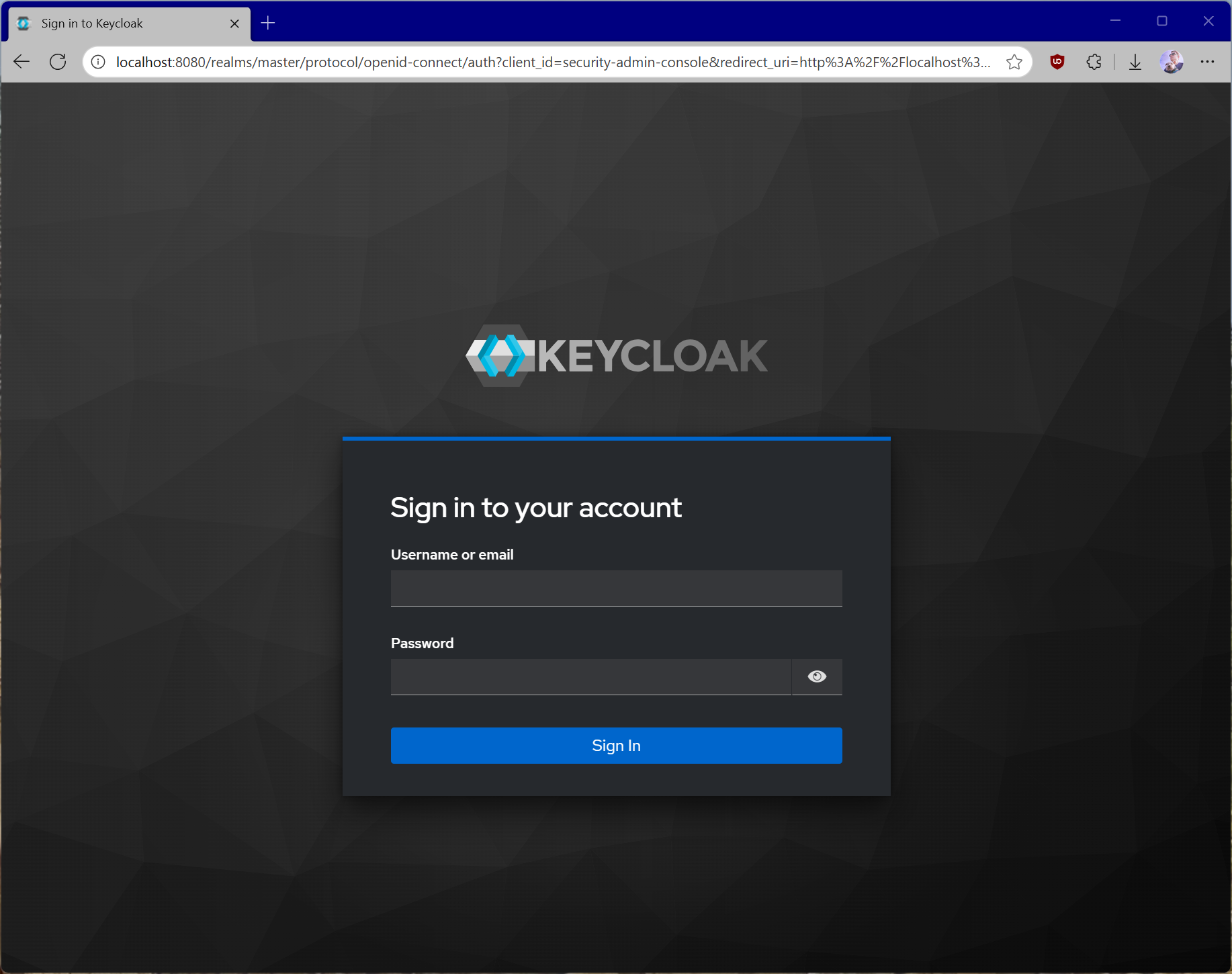
使用默认配置运行时,Keycloak 已经支持我们为 MCP 服务器所需的许多功能,包括动态客户端注册。你可以通过查看 OIDC 配置来确认这一点,其地址为:
http://localhost:8080/realms/master/.well-known/openid-configuration我们还需要配置 Keycloak 以支持我们的 scope,并允许我们的主机(本地机器)动态注册客户端,因为默认策略会限制匿名的动态客户端注册。
转到 Keycloak 仪表盘中的 Client scopes,创建一个新的 mcp:tools scope。我们将使用它来访问我们 MCP 服务器上的所有工具。
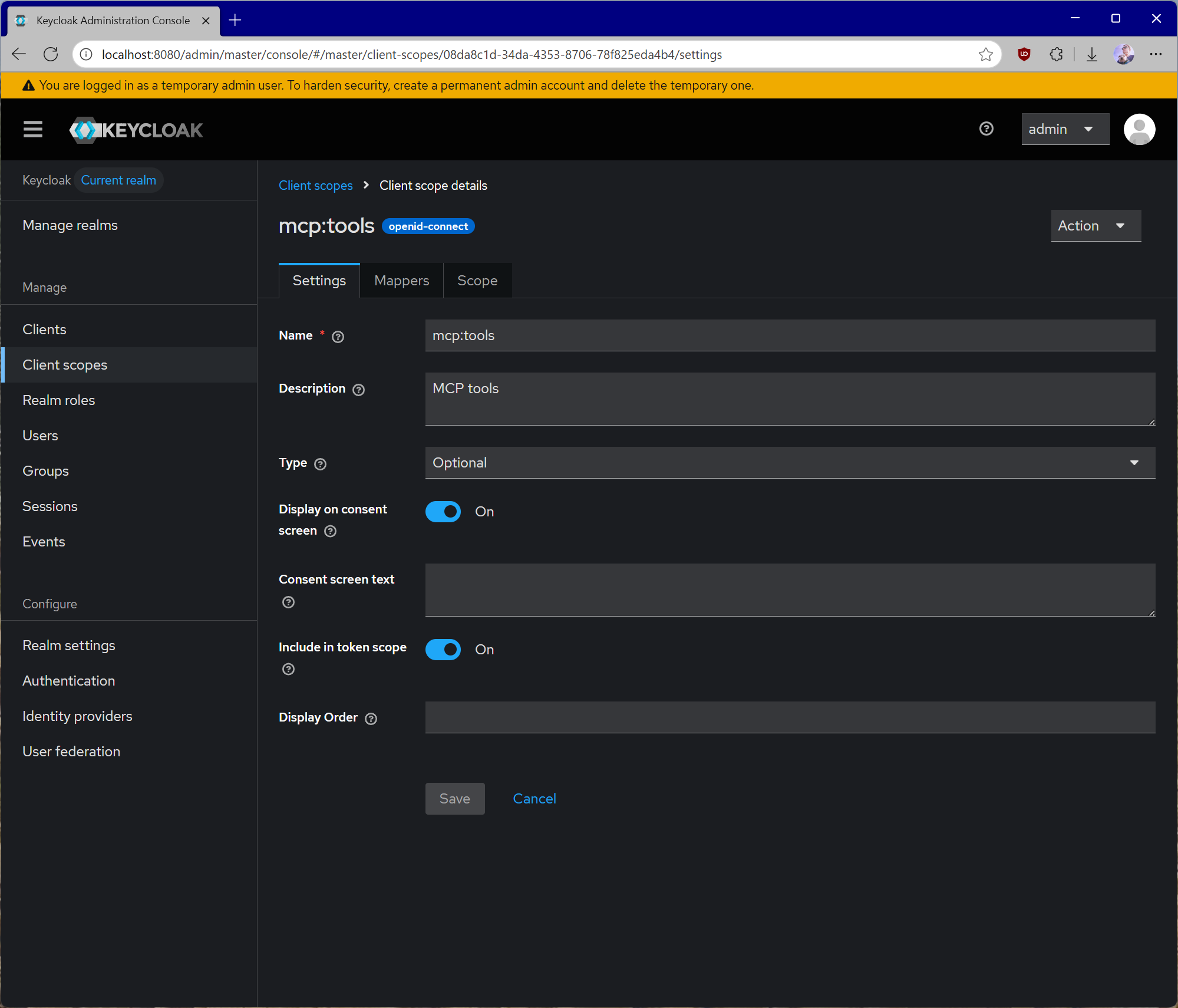
创建 scope 后,请确保将其类型设置为 Default,并打开 Include in token scope 开关,因为 token 验证需要这样做。
现在让我们为 Keycloak 颁发的 token 设置一个 audience。配置 audience 很重要,因为它会将预期的接收方直接嵌入颁发的访问 token 中。这有助于你的 MCP 服务器验证它收到的 token 确实是发给它的,而不是发给其他某个 API 的。这是避免 token 透传场景的关键。
为此,打开你的 mcp:tools 客户端 scope,点击 Mappers,然后点击 Configure a new mapper。选择 Audience。
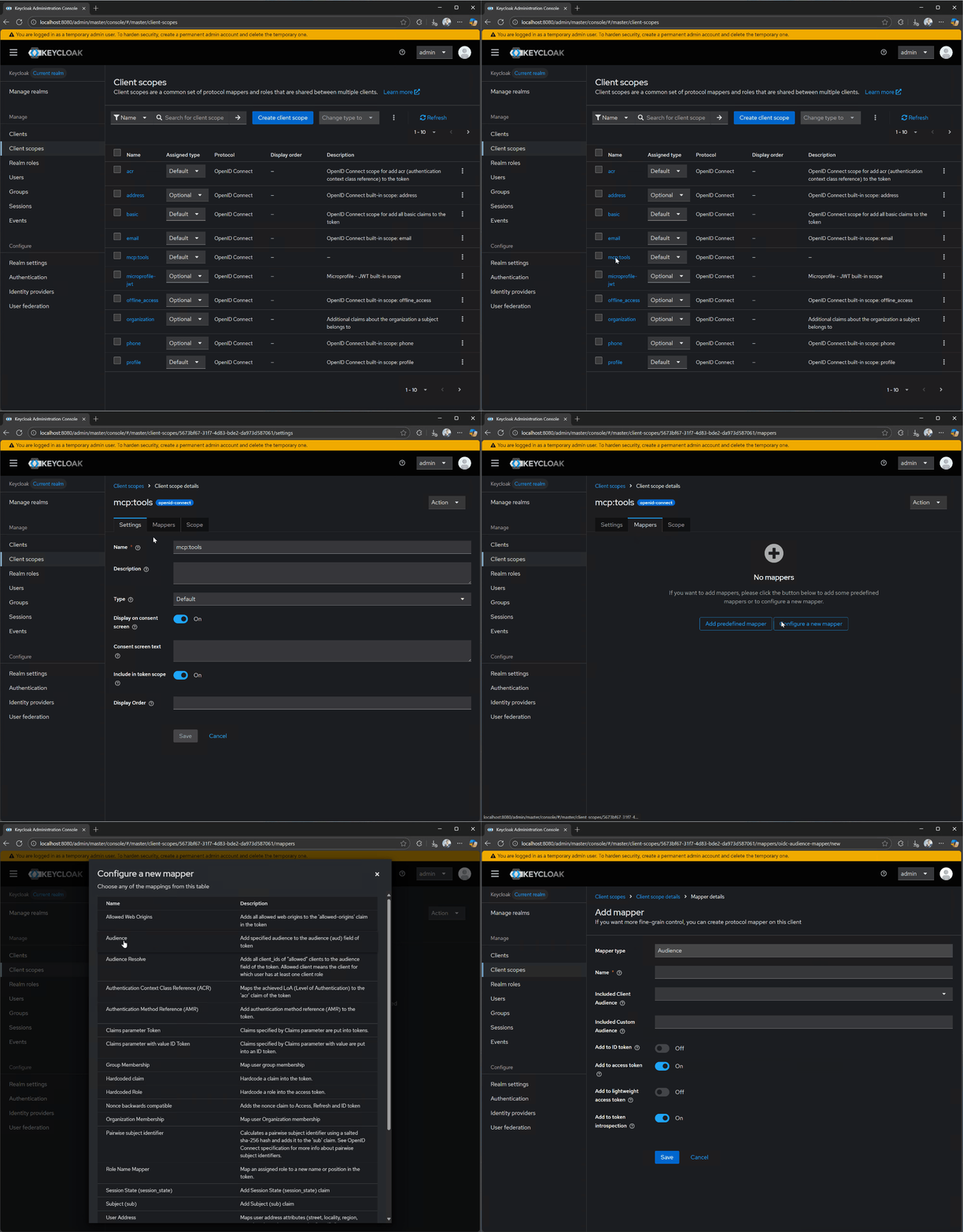
对于 Name,使用 audience-config。为 Included Custom Audience 添加一个值,设置为 http://localhost:3000。这将是我们测试服务器的 URI。
不适用于生产环境
上述 audience 配置仅用于测试。对于生产场景,还需要进行额外的设置和配置,以确保为颁发的 token 正当地约束 audience。具体来说,audience 需要基于客户端传入的 resource 参数,而不是固定值。
接下来,导航到 Clients,然后 Client registration,再然后 Trusted Hosts。禁用 Client URIs Must Match 设置,并添加你进行测试所用的主机。你可以在 Linux 或 macOS 上运行 ifconfig 命令,或在 Windows 上运行 ipconfig 命令来获取当前主机 IP。你可以在 Keycloak 日志中查找类似 Failed to verify remote host : 192.168.215.1 的行,确定需要添加的 IP 地址。请确认该 IP 地址与你的主机关联;根据 Docker 的网络配置,它可能属于桥接网络。
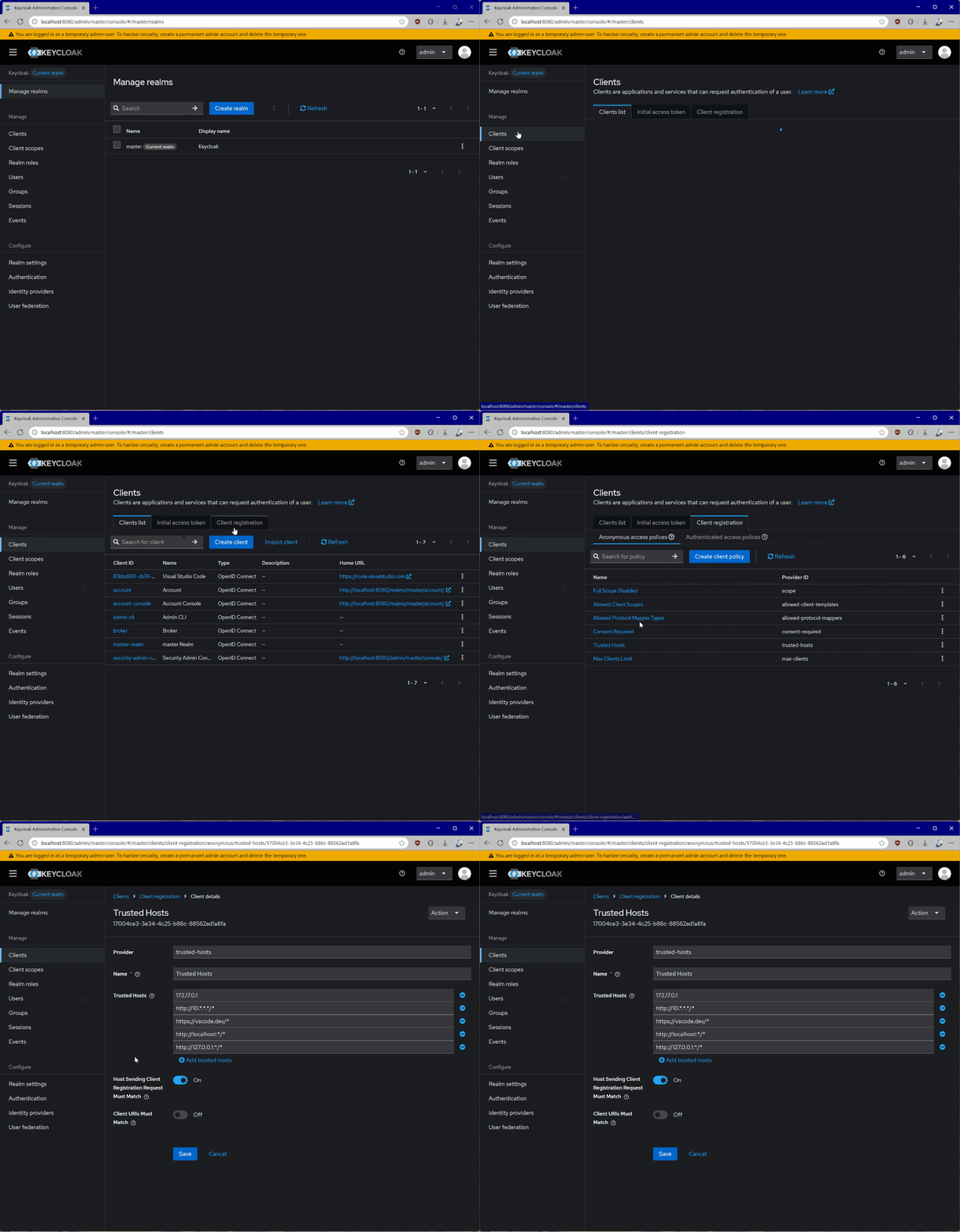
获取主机
如果你是从容器中运行 Keycloak,你还可以在容器日志的终端中看到主机 IP。
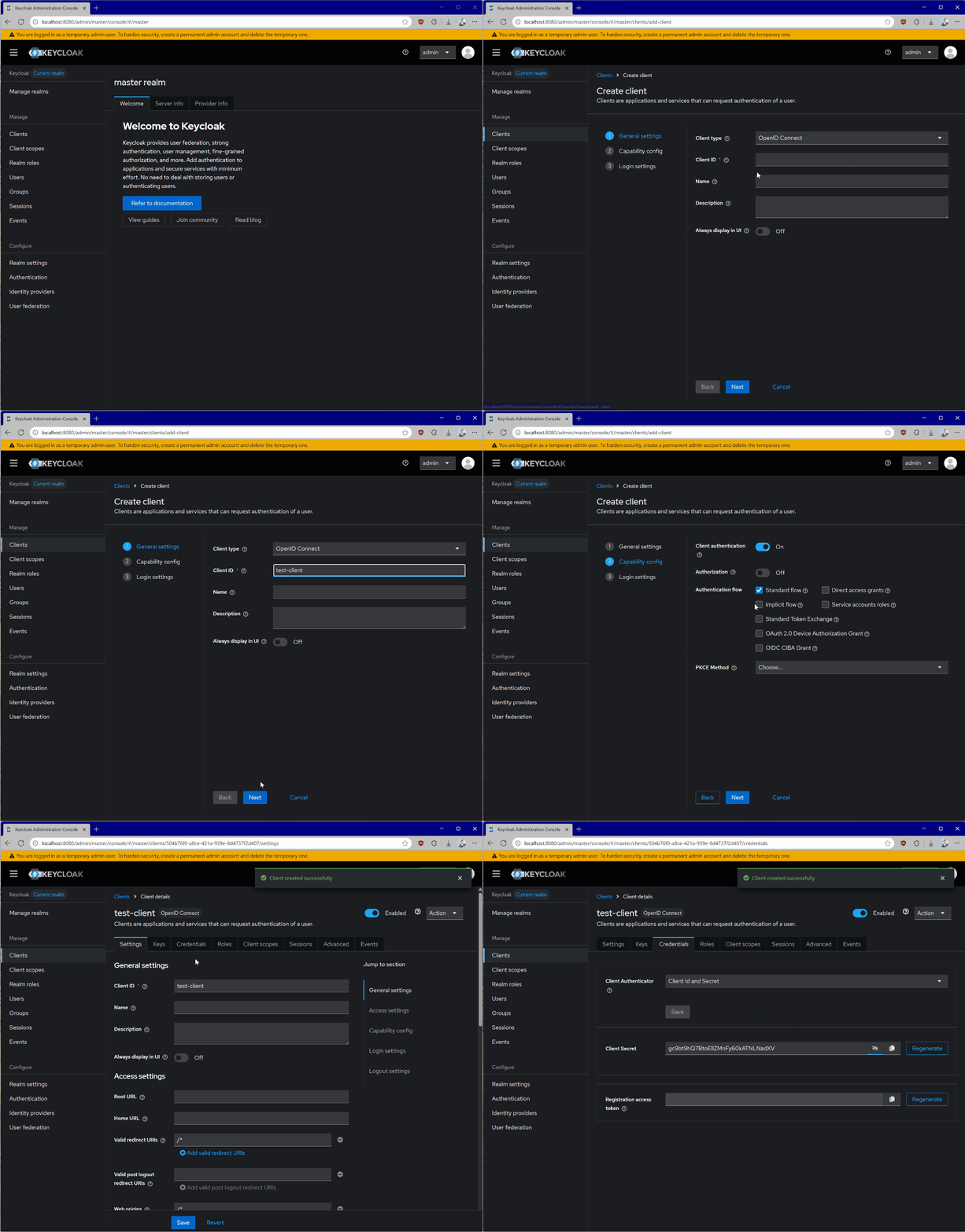
最后,我们需要注册一个新客户端,用于 MCP 服务器自身 与 Keycloak 通信,例如进行 token 内省 。具体操作如下:
- 转到 Clients。
- 点击 Create client。
- 为你的客户端指定一个唯一的 Client ID,然后点击 Next。
- 启用 Client authentication,然后点击 Next。
- 点击 Save。
值得一提的是,token 内省只是验证 token 的可用方法之一。还可以借助针对每种语言和平台独立的库来完成验证。
打开客户端详情后,转到 Credentials 并记下 Client Secret。
处理机密
切勿将客户端凭据直接嵌入代码中。我们建议使用环境变量或专门的机密存储解决方案。
配置好 Keycloak 后,每次触发授权流程,你的 MCP 服务器都会收到一个类似这样的 token:
eyJhbGciOiJSUzI1NiIsInR5cCIgOiAiSldUIiwia2lkIiA6ICI1TjcxMGw1WW5MWk13WGZ1VlJKWGtCS3ZZMzZzb3JnRG5scmlyZ2tlTHlzIn0.eyJleHAiOjE3NTU1NDA4MTcsImlhdCI6MTc1NTU0MDc1NywiYXV0aF90aW1lIjoxNzU1NTM4ODg4LCJqdGkiOiJvbnJ0YWM6YjM0MDgwZmYtODQwNC02ODY3LTgxYmUtMTIzMWI1MDU5M2E4IiwiaXNzIjoiaHR0cDovL2xvY2FsaG9zdDo4MDgwL3JlYWxtcy9tYXN0ZXIiLCJhdWQiOiJodHRwOi8vbG9jYWxob3N0OjMwMDAiLCJzdWIiOiIzM2VkNmM2Yi1jNmUwLTQ5MjgtYTE2MS1mMmY2OWM3YTAzYjkiLCJ0eXAiOiJCZWFyZXIiLCJhenAiOiI3OTc1YTViNi04YjU5LTRhODUtOWNiYS04ZmFlYmRhYjg5NzQiLCJzaWQiOiI4ZjdlYzI3Ni0zNThmLTRjY2MtYjMxMy1kYjA4MjkwZjM3NmYiLCJzY29wZSI6Im1jcDp0b29scyJ9.P5xCRtXORly0R0EXjyqRCUx-z3J4uAOWNAvYtLPXroykZuVCCJ-K1haiQSwbURqfsVOMbL7jiV-sD6miuPzI1tmKOkN_Yct0Vp-azvj7U5rEj7U6tvPfMkg2Uj_jrIX0KOskyU2pVvGZ-5BgqaSvwTEdsGu_V3_E0xDuSBq2uj_wmhqiyTFm5lJ1WkM3Hnxxx1_AAnTj7iOKMFZ4VCwMmk8hhSC7clnDauORc0sutxiJuYUZzxNiNPkmNeQtMCGqWdP1igcbWbrfnNXhJ6NswBOuRbh97_QraET3hl-CNmyS6C72Xc0aOwR_uJ7xVSBTD02OaQ1JA6kjCATz30kGYg解码后,它将看起来像这样:
{
  "alg": "RS256",
  "typ": "JWT",
  "kid": "5N710l5YnLZMwXfuVRJXkBKvY36sorgDnlrirgkeLys"
}.{
  "exp": 1755540817,
  "iat": 1755540757,
  "auth_time": 1755538888,
  "jti": "onrtac:b34080ff-8404-6867-81be-1231b50593a8",
  "iss": "http://localhost:8080/realms/master",
  "aud": "http://localhost:3000",
  "sub": "33ed6c6b-c6e0-4928-a161-f2f69c7a03b9",
  "typ": "Bearer",
  "azp": "7975a5b6-8b59-4a85-9cba-8faebdab8974",
  "sid": "8f7ec276-358f-4ccc-b313-db08290f376f",
  "scope": "mcp:tools"
}.[Signature]
内嵌的 Audience
注意 token 中内嵌的 aud 声明——它当前被设置为测试 MCP 服务器的 URI,并且是根据我们之前配置的 scope 推断出来的。这将是我们实现中需要验证的重要部分。
MCP 服务器设置
我们现在来设置我们的 MCP 服务器,使其使用本地运行的 Keycloak 授权服务器。根据你偏好的编程语言,你可以使用受支持的 MCP SDK 之一。
出于测试目的,我们将创建一个极其简单的 MCP 服务器,它暴露两个工具——一个用于加法,另一个用于乘法。访问这两个工具都需要授权。
TypeScript
你可以在示例仓库 中看到完整的 TypeScript 项目。
在运行下面的代码之前,请确保你有一个包含以下内容的 .env 文件:
# Server host/port
HOST=localhost
PORT=3000

# Auth server location
AUTH_HOST=localhost
AUTH_PORT=8080
AUTH_REALM=master

# Keycloak OAuth client credentials
OAUTH_CLIENT_ID=<YOUR_SERVER_CLIENT_ID>
OAUTH_CLIENT_SECRET=<YOUR_SERVER_CLIENT_SECRET>
OAUTH_CLIENT_ID 和 OAUTH_CLIENT_SECRET 与我们之前创建的 MCP 服务器客户端相关联。
除了实现 MCP 授权规范之外,下面的服务器还通过 Keycloak 进行 token 内省,以确保它从客户端收到的 token 是有效的。它还实现了基本的日志记录,方便你轻松诊断任何问题。
import "dotenv/config";
import express from "express";
import { randomUUID } from "node:crypto";
import { McpServer } from "@modelcontextprotocol/sdk/server/mcp.js";
import { StreamableHTTPServerTransport } from "@modelcontextprotocol/sdk/server/streamableHttp.js";
import { isInitializeRequest } from "@modelcontextprotocol/sdk/types.js";
import { z } from "zod";
import cors from "cors";
import {
  mcpAuthMetadataRouter,
  getOAuthProtectedResourceMetadataUrl,
} from "@modelcontextprotocol/sdk/server/auth/router.js";
import { requireBearerAuth } from "@modelcontextprotocol/sdk/server/auth/middleware/bearerAuth.js";
import { OAuthMetadata } from "@modelcontextprotocol/sdk/shared/auth.js";
import { checkResourceAllowed } from "@modelcontextprotocol/sdk/shared/auth-utils.js";
const CONFIG = {
  host: process.env.HOST || "localhost",
  port: Number(process.env.PORT) || 3000,
  auth: {
    host: process.env.AUTH_HOST || process.env.HOST || "localhost",
    port: Number(process.env.AUTH_PORT) || 8080,
    realm: process.env.AUTH_REALM || "master",
    clientId: process.env.OAUTH_CLIENT_ID || "mcp-server",
    clientSecret: process.env.OAUTH_CLIENT_SECRET || "",
  },
};

function createOAuthUrls() {
  const authBaseUrl = new URL(
    `http://${CONFIG.auth.host}:${CONFIG.auth.port}/realms/${CONFIG.auth.realm}/`,
  );
  return {
    issuer: authBaseUrl.toString(),
    introspection_endpoint: new URL(
      "protocol/openid-connect/token/introspect",
      authBaseUrl,
    ).toString(),
    authorization_endpoint: new URL(
      "protocol/openid-connect/auth",
      authBaseUrl,
    ).toString(),
    token_endpoint: new URL(
      "protocol/openid-connect/token",
      authBaseUrl,
    ).toString(),
  };
}

function createRequestLogger() {
  return (req: any, res: any, next: any) => {
    const start = Date.now();
    res.on("finish", () => {
      const ms = Date.now() - start;
      console.log(
        `${req.method} ${req.originalUrl} -> ${res.statusCode} ${ms}ms`,
      );
    });
    next();
  };
}

const app = express();

app.use(
  express.json({
    verify: (req: any, _res, buf) => {
      req.rawBody = buf?.toString() ?? "";
    },
  }),
);

app.use(
  cors({
    origin: "*",
    exposedHeaders: ["Mcp-Session-Id"],
  }),
);

app.use(createRequestLogger());

const mcpServerUrl = new URL(`http://${CONFIG.host}:${CONFIG.port}`);
const oauthUrls = createOAuthUrls();

const oauthMetadata: OAuthMetadata = {
  ...oauthUrls,
  response_types_supported: ["code"],
};

const tokenVerifier = {
  verifyAccessToken: async (token: string) => {
    const endpoint = oauthMetadata.introspection_endpoint;

    if (!endpoint) {
      console.error("[auth] no introspection endpoint in metadata");
      throw new Error("No token verification endpoint available in metadata");
    }

    const params = new URLSearchParams({
      token: token,
      client_id: CONFIG.auth.clientId,
    });

    if (CONFIG.auth.clientSecret) {
      params.set("client_secret", CONFIG.auth.clientSecret);
    }

    let response: Response;
    try {
      response = await fetch(endpoint, {
        method: "POST",
        headers: {
          "Content-Type": "application/x-www-form-urlencoded",
        },
        body: params.toString(),
      });
    } catch (e) {
      console.error("[auth] introspection fetch threw", e);
      throw e;
    }

    if (!response.ok) {
      const txt = await response.text();
      console.error("[auth] introspection non-OK", { status: response.status });

      try {
        const obj = JSON.parse(txt);
        console.log(JSON.stringify(obj, null, 2));
      } catch {
        console.error(txt);
      }
      throw new Error(`Invalid or expired token: ${txt}`);
    }

    let data: any;
    try {
      data = await response.json();
    } catch (e) {
      const txt = await response.text();
      console.error("[auth] failed to parse introspection JSON", {
        error: String(e),
        body: txt,
      });
      throw e;
    }

    if (data.active === false) {
      throw new Error("Inactive token");
    }

    if (!data.aud) {
      throw new Error("Resource indicator (aud) missing");
    }

    const audiences: string[] = Array.isArray(data.aud) ? data.aud : [data.aud];
    const allowed = audiences.some((a) => {
      try {
        return checkResourceAllowed({
          requestedResource: a,
          configuredResource: mcpServerUrl,
        });
      } catch {
        // Keycloak tokens include non-URL audiences (e.g. "account", "test-client").
        // Those are never our resource, so treat them as "no match" instead of crashing.
        return false;
      }
    });
    if (!allowed) {
      throw new Error(
        `None of the provided audiences are allowed. Expected ${mcpServerUrl}, got: ${audiences.join(", ")}`,
      );
    }

    return {
      token,
      clientId: data.client_id,
      scopes: data.scope ? data.scope.split(" ") : [],
      expiresAt: data.exp,
    };
  },
};
app.use(
  mcpAuthMetadataRouter({
    oauthMetadata,
    resourceServerUrl: mcpServerUrl,
    scopesSupported: ["mcp:tools"],
    resourceName: "MCP Demo Server",
  }),
);

const authMiddleware = requireBearerAuth({
  verifier: tokenVerifier,
  requiredScopes: [],
  resourceMetadataUrl: getOAuthProtectedResourceMetadataUrl(mcpServerUrl),
});

const transports: { [sessionId: string]: StreamableHTTPServerTransport } = {};

function createMcpServer() {
  const server = new McpServer({
    name: "example-server",
    version: "1.0.0",
  });

  server.registerTool(
    "add",
    {
      title: "Addition Tool",
      description: "Add two numbers together",
      inputSchema: {
        a: z.number().describe("First number to add"),
        b: z.number().describe("Second number to add"),
      },
    },
    async ({ a, b }) => ({
      content: [{ type: "text", text: `${a} + ${b} = ${a + b}` }],
    }),
  );

  server.registerTool(
    "multiply",
    {
      title: "Multiplication Tool",
      description: "Multiply two numbers together",
      inputSchema: {
        x: z.number().describe("First number to multiply"),
        y: z.number().describe("Second number to multiply"),
      },
    },
    async ({ x, y }) => ({
      content: [{ type: "text", text: `${x} × ${y} = ${x * y}` }],
    }),
  );

  return server;
}

const mcpPostHandler = async (req: express.Request, res: express.Response) => {
  const sessionId = req.headers["mcp-session-id"] as string | undefined;
  let transport: StreamableHTTPServerTransport;

  if (sessionId && transports[sessionId]) {
    transport = transports[sessionId];
  } else if (!sessionId && isInitializeRequest(req.body)) {
    transport = new StreamableHTTPServerTransport({
      sessionIdGenerator: () => randomUUID(),
      onsessioninitialized: (sessionId) => {
        transports[sessionId] = transport;
      },
    });

    transport.onclose = () => {
      if (transport.sessionId) {
        delete transports[transport.sessionId];
      }
    };

    const server = createMcpServer();
    await server.connect(transport);
  } else {
    res.status(400).json({
      jsonrpc: "2.0",
      error: {
        code: -32000,
        message: "Bad Request: No valid session ID provided",
      },
      id: null,
    });
    return;
  }

  await transport.handleRequest(req, res, req.body);
};

const handleSessionRequest = async (
  req: express.Request,
  res: express.Response,
) => {
  const sessionId = req.headers["mcp-session-id"] as string | undefined;
  if (!sessionId || !transports[sessionId]) {
    res.status(400).send("Invalid or missing session ID");
    return;
  }

  const transport = transports[sessionId];
  await transport.handleRequest(req, res);
};

app.post("/", authMiddleware, mcpPostHandler);
app.get("/", authMiddleware, handleSessionRequest);
app.delete("/", authMiddleware, handleSessionRequest);

app.listen(CONFIG.port, CONFIG.host, () => {
  console.log(`🚀 MCP Server running on ${mcpServerUrl.origin}`);
  console.log(`📡 MCP endpoint available at ${mcpServerUrl.origin}`);
  console.log(
    `🔐 OAuth metadata available at ${getOAuthProtectedResourceMetadataUrl(mcpServerUrl)}`,
  );
});
当你运行服务器时,可以通过提供 MCP 服务器端点将其添加到你的 MCP 客户端(例如 Visual Studio Code)中。
有关在 TypeScript 中实现 MCP 服务器的更多细节,请参阅 TypeScript SDK 文档 。
Python
你可以在示例仓库 中看到完整的 Python 项目。
为了简化我们的授权交互,在 Python 场景中我们依赖 Python SDK
中的 MCPServer 类。它会发布受保护资源元数据文档,对未经身份验证的请求以 401 响应且其 WWW-Authenticate 头指向该文档,并将每个 bearer token 交给我们所提供的验证器处理。许多围绕授权的约定(如端点和 token 验证逻辑)在各语言间是一致的,但有些语言提供了更简单的方式在生产场景中集成它们。
在编写实际服务器之前,我们需要在 config.py 中设置配置——其内容完全基于你的本地服务器设置:
"""Configuration settings for the MCP auth server."""

import os


class Config:
    """Configuration class that loads from environment variables with sensible defaults."""

    # Server settings
    HOST: str = os.getenv("HOST", "localhost")
    PORT: int = int(os.getenv("PORT", "3000"))

    # Auth server settings
    AUTH_HOST: str = os.getenv("AUTH_HOST", "localhost")
    AUTH_PORT: int = int(os.getenv("AUTH_PORT", "8080"))
    AUTH_REALM: str = os.getenv("AUTH_REALM", "master")

    # OAuth client settings
    OAUTH_CLIENT_ID: str = os.getenv("OAUTH_CLIENT_ID", "test-client")
    OAUTH_CLIENT_SECRET: str = os.getenv("OAUTH_CLIENT_SECRET", "")

    # Scope required on every token
    MCP_SCOPE: str = os.getenv("MCP_SCOPE", "mcp:tools")

    @property
    def server_url(self) -> str:
        """Build the server URL."""
        return f"http://{self.HOST}:{self.PORT}"

    @property
    def auth_base_url(self) -> str:
        """Build the auth server base URL."""
        return f"http://{self.AUTH_HOST}:{self.AUTH_PORT}/realms/{self.AUTH_REALM}/"


# Global configuration instance
config = Config()
OAUTH_CLIENT_ID 和 OAUTH_CLIENT_SECRET 与我们之前创建的 MCP 服务器客户端相关联。在启动服务器之前,请在环境中设置它们。
服务器实现如下:
import datetime
import logging
from typing import Any
from urllib.parse import urljoin

from pydantic import AnyHttpUrl

from mcp.server import MCPServer
from mcp.server.auth.settings import AuthSettings

from .config import config
from .token_verifier import IntrospectionTokenVerifier

logger = logging.getLogger(__name__)


def create_oauth_urls() -> dict[str, str]:
    """Create OAuth URLs based on configuration (Keycloak-style)."""
    auth_base_url = config.auth_base_url

    return {
        "issuer": auth_base_url,
        "introspection_endpoint": urljoin(auth_base_url, "protocol/openid-connect/token/introspect"),
        "authorization_endpoint": urljoin(auth_base_url, "protocol/openid-connect/auth"),
        "token_endpoint": urljoin(auth_base_url, "protocol/openid-connect/token"),
    }


def create_server() -> MCPServer:
    """Create and configure the MCP server."""

    oauth_urls = create_oauth_urls()

    token_verifier = IntrospectionTokenVerifier(
        introspection_endpoint=oauth_urls["introspection_endpoint"],
        server_url=config.server_url,
        client_id=config.OAUTH_CLIENT_ID,
        client_secret=config.OAUTH_CLIENT_SECRET,
    )

    app = MCPServer(
        name="MCP Resource Server",
        instructions="Resource Server that validates tokens via Authorization Server introspection",
        debug=True,
        token_verifier=token_verifier,
        auth=AuthSettings(
            issuer_url=AnyHttpUrl(oauth_urls["issuer"]),
            required_scopes=[config.MCP_SCOPE],
            resource_server_url=AnyHttpUrl(config.server_url),
        ),
    )

    @app.tool()
    async def add_numbers(a: float, b: float) -> dict[str, Any]:
        """
        Add two numbers together.
        This tool demonstrates basic arithmetic operations with OAuth authentication.

        Args:
            a: The first number to add
            b: The second number to add
        """
        result = a + b
        return {
            "operation": "addition",
            "operand_a": a,
            "operand_b": b,
            "result": result,
            "timestamp": datetime.datetime.now().isoformat(),
        }

    @app.tool()
    async def multiply_numbers(x: float, y: float) -> dict[str, Any]:
        """
        Multiply two numbers together.
        This tool demonstrates basic arithmetic operations with OAuth authentication.

        Args:
            x: The first number to multiply
            y: The second number to multiply
        """
        result = x * y
        return {
            "operation": "multiplication",
            "operand_x": x,
            "operand_y": y,
            "result": result,
            "timestamp": datetime.datetime.now().isoformat(),
        }

    return app


def main() -> int:
    """
    Run the MCP Resource Server.

    This server:
    - Provides RFC 9728 Protected Resource Metadata
    - Validates tokens via Authorization Server introspection
    - Serves MCP tools requiring authentication

    Configuration is loaded from config.py and environment variables.
    """
    logging.basicConfig(level=logging.INFO)

    oauth_urls = create_oauth_urls()

    try:
        mcp_server = create_server()

        logger.info("Starting MCP Server on %s:%s", config.HOST, config.PORT)
        logger.info("Authorization Server: %s", oauth_urls["issuer"])

        mcp_server.run(
            transport="streamable-http",
            host=config.HOST,
            port=config.PORT,
            streamable_http_path="/",
        )
        return 0

    except Exception:
        logger.exception("Server error")
        return 1


if __name__ == "__main__":
    exit(main())
最后,token 验证逻辑完全委托给 token_verifier.py,确保我们可以使用 Keycloak 内省端点来验证任何凭据产物的有效性。
"""Token verifier implementation using OAuth 2.0 Token Introspection (RFC 7662)."""

import logging
from typing import Any

import httpx2

from mcp.server.auth.provider import AccessToken, TokenVerifier
from mcp.shared.auth_utils import check_resource_allowed, resource_url_from_server_url

logger = logging.getLogger(__name__)


class IntrospectionTokenVerifier(TokenVerifier):
    """Token verifier that uses OAuth 2.0 Token Introspection (RFC 7662)."""

    def __init__(
        self,
        introspection_endpoint: str,
        server_url: str,
        client_id: str,
        client_secret: str,
    ):
        self.introspection_endpoint = introspection_endpoint
        self.server_url = server_url
        self.client_id = client_id
        self.client_secret = client_secret
        self.resource_url = resource_url_from_server_url(server_url)

    async def verify_token(self, token: str) -> AccessToken | None:
        """Verify token via introspection endpoint."""
        if not self.introspection_endpoint.startswith(("https://", "http://localhost", "http://127.0.0.1")):
            return None

        timeout = httpx2.Timeout(10.0, connect=5.0)
        limits = httpx2.Limits(max_connections=10, max_keepalive_connections=5)

        async with httpx2.AsyncClient(
            timeout=timeout,
            limits=limits,
            verify=True,
        ) as client:
            try:
                form_data = {
                    "token": token,
                    "client_id": self.client_id,
                }
                # Only send client_secret when one is configured
                # Public clients authenticate with client_id alone.
                if self.client_secret:
                    form_data["client_secret"] = self.client_secret
                headers = {"Content-Type": "application/x-www-form-urlencoded"}

                response = await client.post(
                    self.introspection_endpoint,
                    data=form_data,
                    headers=headers,
                )

                if response.status_code != 200:
                    return None

                data = response.json()
                if not data.get("active", False):
                    return None

                if not self._validate_resource(data):
                    return None

                return AccessToken(
                    token=token,
                    client_id=data.get("client_id", "unknown"),
                    scopes=data.get("scope", "").split() if data.get("scope") else [],
                    expires_at=data.get("exp"),
                    # AccessToken.resource is `str | None`. Keycloak returns `aud`
                    # as a *list* here (e.g. ["test-client", "http://localhost:3000",
                    # "account"]); passing that list straight in raises a pydantic
                    # ValidationError that the broad `except` below turns into a
                    # silent 401. We already confirmed this server's resource is a
                    # valid audience in `_validate_resource`, so record that.
                    resource=self.resource_url,
                    subject=data.get("sub"),  # RFC 7662 subject (resource owner)
                    claims=data,
                )

            except Exception:
                logger.exception("Token introspection failed")
                return None

    def _validate_resource(self, token_data: dict[str, Any]) -> bool:
        """Validate token was issued for this resource server.

        Rules:
        - Reject if 'aud' missing.
        - Accept if any audience entry matches the derived resource URL.
        - Supports string or list forms per JWT spec.
        """
        if not self.server_url or not self.resource_url:
            return False

        aud: list[str] | str | None = token_data.get("aud")
        if isinstance(aud, list):
            return any(self._is_valid_resource(a) for a in aud)
        if isinstance(aud, str):
            return self._is_valid_resource(aud)
        return False

    def _is_valid_resource(self, resource: str) -> bool:
        """Check if the given resource matches our server."""
        return check_resource_allowed(requested_resource=self.resource_url, configured_resource=resource)
更多细节请参见下文或 Python SDK 文档 。
Python MCP 服务器
在服务器根目录下有一个 pyproject.toml 文件和一个 mcp_server 文件夹。将所有 Python 文件放在 mcp_server 文件夹中,并按如下方式填写 pyproject.toml 文件:
[project]
name = "mcp-simple-auth"
version = "0.1.0"
description = "A simple MCP server demonstrating OAuth authentication"
requires-python = ">=3.10"
authors = [{ name = "Model Context Protocol a Series of LF Projects, LLC." }]
license = { text = "MIT" }
dependencies = [
  "httpx2>=2.5.0",
  "mcp>=2.0.0rc1",
  "pydantic>=2.0",
]

[project.scripts]
mcp-simple-auth-rs = "mcp_server.server:main"

[build-system]
requires = ["hatchling"]
build-backend = "hatchling.build"

[tool.hatch.build.targets.wheel]
packages = ["mcp_server"]

[dependency-groups]
dev = ["pyright>=1.1.391", "pytest>=8.3.4", "ruff>=0.8.5"]
然后运行下面的命令来启动服务器。
uv sync
uv run mcp-simple-auth-rs
C#
你可以在示例仓库 中看到完整的 C# 项目。
要使用 MCP C# SDK 在你的 MCP 服务器中设置授权,你可以依托标准的 ASP.NET Core builder 模式。我们将使用 ASP.NET Core 内置的 token 验证能力,而不是使用 Keycloak 提供的内省端点。
在服务器文件夹的根目录下,创建两个文件 Program.cs 和 ProtectedMcpServer.csproj,以及一个 Tools 文件夹。用以下内容填充 Program.cs:
using Microsoft.AspNetCore.Authentication.JwtBearer;
using Microsoft.IdentityModel.Tokens;
using ModelContextProtocol.AspNetCore.Authentication;
using ProtectedMcpServer.Tools;
using System.Security.Claims;

var builder = WebApplication.CreateBuilder(args);

var serverUrl = "http://localhost:3000/";
var authorizationServerUrl = "http://localhost:8080/realms/master/";

builder.Services.AddAuthentication(options =>
{
    options.DefaultChallengeScheme = McpAuthenticationDefaults.AuthenticationScheme;
    options.DefaultAuthenticateScheme = JwtBearerDefaults.AuthenticationScheme;
})
.AddJwtBearer(options =>
{
    options.Authority = authorizationServerUrl;
    var normalizedServerAudience = serverUrl.TrimEnd('/');
    options.TokenValidationParameters = new TokenValidationParameters
    {
        ValidIssuer = authorizationServerUrl,
        ValidAudiences = new[] { normalizedServerAudience, serverUrl },
        AudienceValidator = (audiences, securityToken, validationParameters) =>
        {
            if (audiences == null) return false;
            foreach (var aud in audiences)
            {
                if (string.Equals(aud.TrimEnd('/'), normalizedServerAudience, StringComparison.OrdinalIgnoreCase))
                {
                    return true;
                }
            }
            return false;
        }
    };

    options.RequireHttpsMetadata = false; // Set to true in production

    options.Events = new JwtBearerEvents
    {
        OnTokenValidated = context =>
        {
            var name = context.Principal?.Identity?.Name ?? "unknown";
            var email = context.Principal?.FindFirstValue("preferred_username") ?? "unknown";
            Console.WriteLine($"Token validated for: {name} ({email})");
            return Task.CompletedTask;
        },
        OnAuthenticationFailed = context =>
        {
            Console.WriteLine($"Authentication failed: {context.Exception.Message}");
            return Task.CompletedTask;
        },
    };
})
.AddMcp(options =>
{
    options.ResourceMetadata = new()
    {
        Resource = serverUrl,
        ResourceDocumentation = "https://docs.example.com/api/math",
        AuthorizationServers = { authorizationServerUrl },
        ScopesSupported = ["mcp:tools"]
    };
});

builder.Services.AddAuthorization();

builder.Services.AddHttpContextAccessor();
builder.Services.AddMcpServer()
    .WithTools<MathTools>()
    .WithHttpTransport();

var app = builder.Build();

app.UseAuthentication();
app.UseAuthorization();

app.MapMcp().RequireAuthorization();

Console.WriteLine($"Starting MCP server with authorization at {serverUrl}");
Console.WriteLine($"Using Keycloak server at {authorizationServerUrl}");
Console.WriteLine($"Protected Resource Metadata URL: {serverUrl}.well-known/oauth-protected-resource");
Console.WriteLine("Exposed Math tools: Add, Multiply");
Console.WriteLine("Press Ctrl+C to stop the server");

app.Run(serverUrl);
用以下内容填充 ProtectedMcpServer.csproj:
<Project Sdk="Microsoft.NET.Sdk.Web">

  <PropertyGroup>
    <TargetFramework>net9.0</TargetFramework>
    <Nullable>enable</Nullable>
    <ImplicitUsings>enable</ImplicitUsings>
    <!-- Identifier for the local secret store, not a secret itself. -->
    <UserSecretsId>local-authorization-mcp-server</UserSecretsId>
  </PropertyGroup>

  <ItemGroup>
    <PackageReference Include="Microsoft.AspNetCore.Authentication.JwtBearer" Version="9.0.18" />
    <PackageReference Include="ModelContextProtocol" Version="2.0.0" />
    <PackageReference Include="ModelContextProtocol.AspNetCore" Version="2.0.0" />
  </ItemGroup>

</Project>
在 Tools 文件夹中,创建 MathTools.cs 并用以下内容填充:
using System.ComponentModel;
using ModelContextProtocol.Server;

namespace ProtectedMcpServer.Tools;

[McpServerToolType]
public sealed class MathTools
{
    [McpServerTool, Description("Add two numbers together.")]
    public Task<double> Add(
        [Description("First operand")] double a,
        [Description("Second operand")] double b)
    {
        return Task.FromResult(a + b);
    }

    [McpServerTool, Description("Multiply two numbers together.")]
    public Task<double> Multiply(
        [Description("First operand")] double a,
        [Description("Second operand")] double b)
    {
        return Task.FromResult(a * b);
    }
}
然后从服务器根目录运行:
dotnet run更多细节请参见 C# SDK 文档 。
测试 MCP 服务器
出于测试目的,我们将使用 Visual Studio Code ,但任何支持 MCP 和新授权规范的客户端都可以。
按 Cmd + Shift + P 并选择 MCP: Add server…。选择 HTTP 并输入 http://localhost:3000。为服务器指定一个在 Visual Studio Code 内部使用的唯一名称。现在你应该能在 mcp.json 中看到类似这样的条目:
"my-mcp-server-18676652": {
  "url": "http://localhost:3000",
  "type": "http"
}
连接时,你将被带到浏览器,在那里系统会提示你同意 Visual Studio Code 访问 mcp:tools scope。
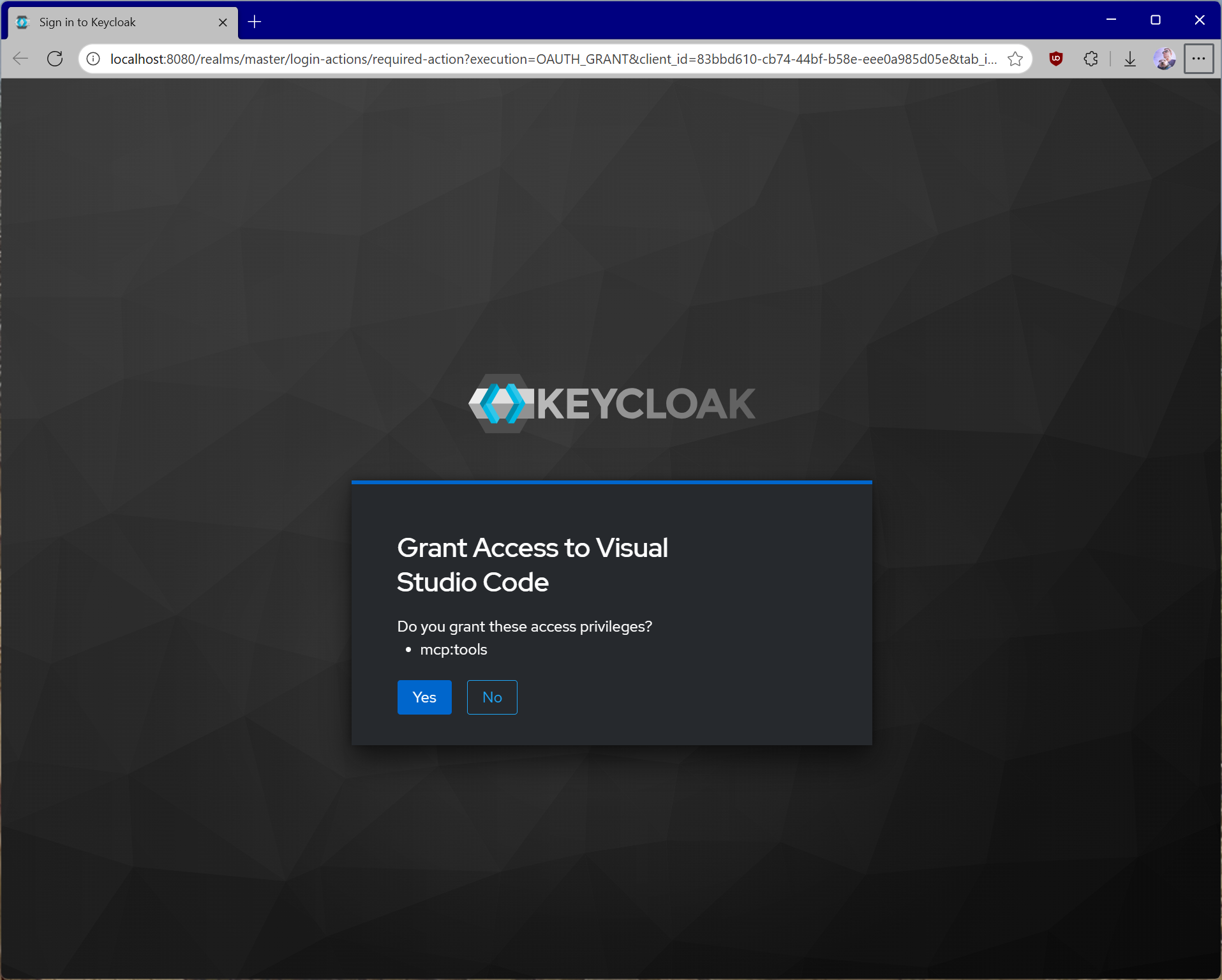
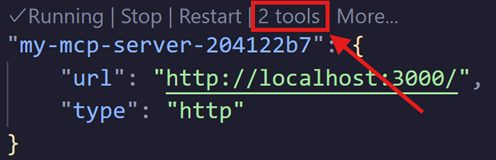
同意后,你将看到工具列在 mcp.json 中服务器条目的正上方。
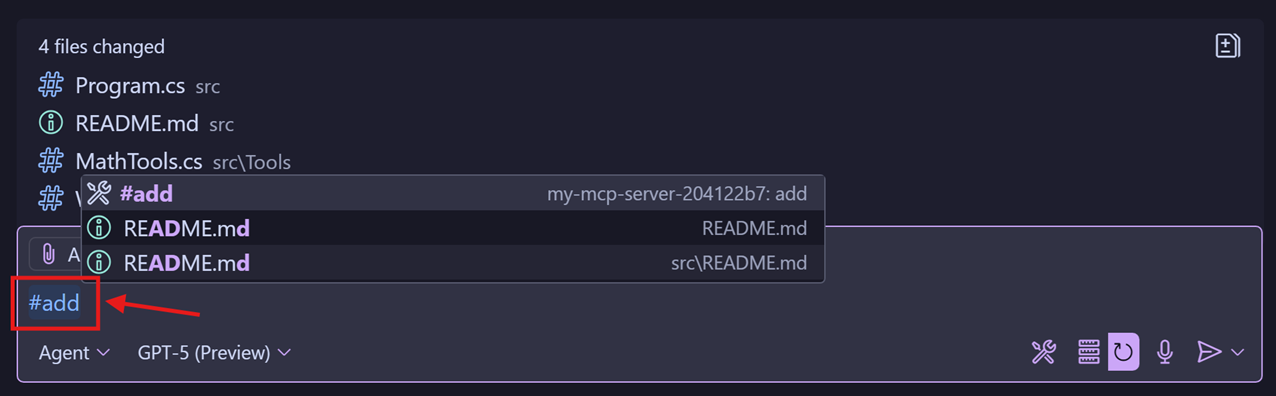
你将能够在聊天视图中借助 # 号调用各个工具。
常见陷阱及规避方法
有关全面的安全指导(包括攻击向量、缓解策略和实现最佳实践),请务必通读安全最佳实践(英文) 。下面指出几个关键问题。
- 不要自行实现 token 验证或授权逻辑。对于 token 验证或授权决策这类事情,请使用现成的、经过充分测试且安全的库。一切从零开始意味着你更有可能实现出错,除非你是安全专家。
- 使用短生命周期的访问 token。取决于所用的授权服务器,此设置可能是可定制的。我们建议不要使用长生命周期的 token——如果被恶意行为者窃取,他们就能在更长时间内保持访问权限。
- 始终验证 token。你的服务器收到 token 并不意味着该 token 有效,也不意味着它是发给你的服务器的。始终验证你的 MCP 服务器从客户端收到的东西是否符合要求。
- 将 token 存储在安全、加密的存储中。在某些场景下,你可能需要在服务器端缓存 token。如果是这样,请确保存储具有适当的访问控制,并且不容易被能访问你服务器的恶意方窃取。你还应该实现稳健的缓存逐出策略,以确保你的 MCP 服务器不会重复使用已过期或其他无效的 token。
- 在生产环境强制使用 HTTPS。除开发期间对
localhost外,不要通过明文 HTTP 接受 token 或重定向回调。 - 最小权限 scope。不要使用包罗万象的 scope。在可能的情况下按工具或能力拆分访问权限,并在资源服务器上按路由/工具验证所需 scope。
- 不要记录凭据。切勿记录
Authorization头、token、授权码或机密。清除查询字符串和头信息。在结构化日志中脱敏敏感字段。 - 区分应用与资源服务器的凭据。不要将 MCP 服务器的客户端机密复用于最终用户流程。将所有机密存储在合适的机密管理器中,而不是放在源代码控制中。
- 返回恰当的质询。在返回 401 时包含
WWW-Authenticate头,并在其中提供Bearer、realm和resource_metadata,以便客户端发现如何进行身份验证。 - DCR(动态客户端注册)控制。如果启用,请注意你组织特有的约束,例如受信任主机、必要的审查和审计注册。未经身份验证的 DCR 意味着任何人都可以在你的授权服务器上注册任意客户端。
- 多租户/realm 混淆。除非明确是多租户,否则固定使用单一 issuer/租户。即使 token 由同一授权服务器签名,也要拒绝来自其他 realm 的 token。
- audience/resource 指示符误用。不要配置或接受泛化的 audience(如
api)或不相关的资源。要求 audience/resource 与你的已配置服务器匹配。 - 错误细节泄露。向客户端返回通用消息,但在内部记录带有关联 ID 的详细原因,以帮助排查问题而不暴露内部信息。
- 会话标识符加固。将
Mcp-Session-Id视为不受信任的输入;绝不要将授权与它绑定。在认证变化时重新生成,并在服务器端验证其生命周期。
相关标准与文档
MCP 授权建立在以下成熟标准之上:
更多细节请参阅:
理解这些标准将帮助你正确实现授权,并在问题出现时进行排查。