Build an MCP Server
This tutorial guides you through building a fully functional MCP server from scratch, helping you understand the core concepts and implementation details of the MCP protocol.
Why Build an MCP Server
MCP (Model Context Protocol) servers are the bridge connecting AI assistants with external data and tools. By building an MCP server, you can:
- Extend AI Capabilities: Enable Claude and other AI assistants to access your data and services
- Maintain Data Sovereignty: Data stays on your side, AI accesses it via protocol
- Unified Interface: Build once, use with multiple AI applications
Use Cases
| Use Case | Description |
|---|---|
| Custom AI Apps | Add AI capabilities and external tools to your applications |
| Automation Workflows | Automatically call various APIs and services via AI |
| Data Analysis | Let AI access your data sources for analysis |
| Enterprise Integration | Integrate AI into existing business systems |
Core Concepts
MCP servers provide three main capabilities:
- Tools: Functions that LLMs can call (with user approval)
- Resources: File-like data that clients can read
- Prompts: Pre-written templates to help users accomplish specific tasks
  flowchart LR
    subgraph AI_Client["AI Client"]
        Claude["Claude & Others"]
    end

    subgraph MCP_Server["MCP Server"]
        Tools["Tools<br/>Function Calls"]
        Resources["Resources<br/>Data Access"]
        Prompts["Prompts<br/>Templates"]
    end

    subgraph Data_Source["Data Sources"]
        API["External APIs"]
        DB["Databases"]
        Files["File System"]
    end

    Claude <--> MCP_Server
    MCP_Server --> Data_Source

    style Tools fill:#e3f2fd
    style Resources fill:#e8f5e9
    style Prompts fill:#fff3e0
What We’ll Build
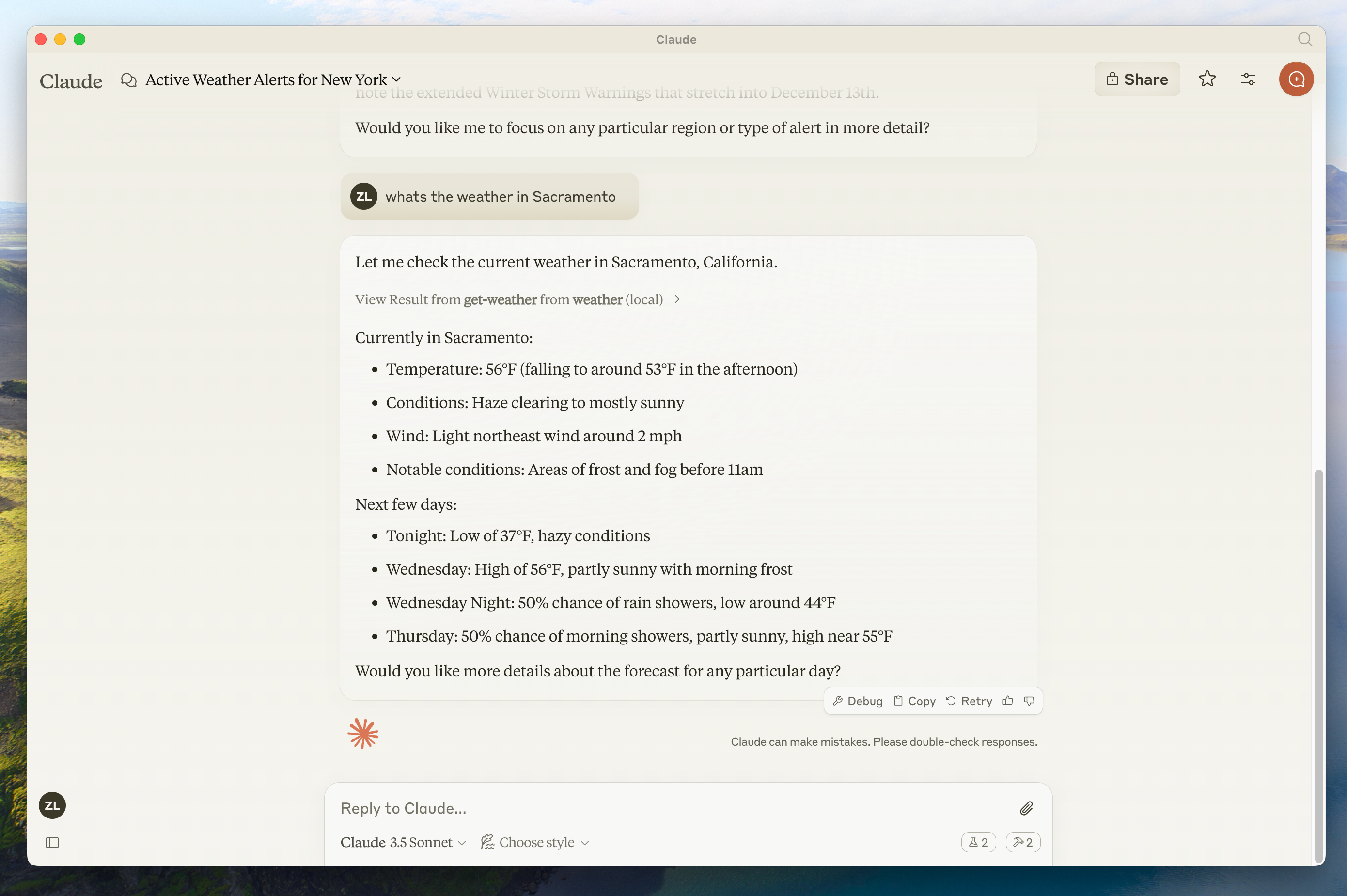
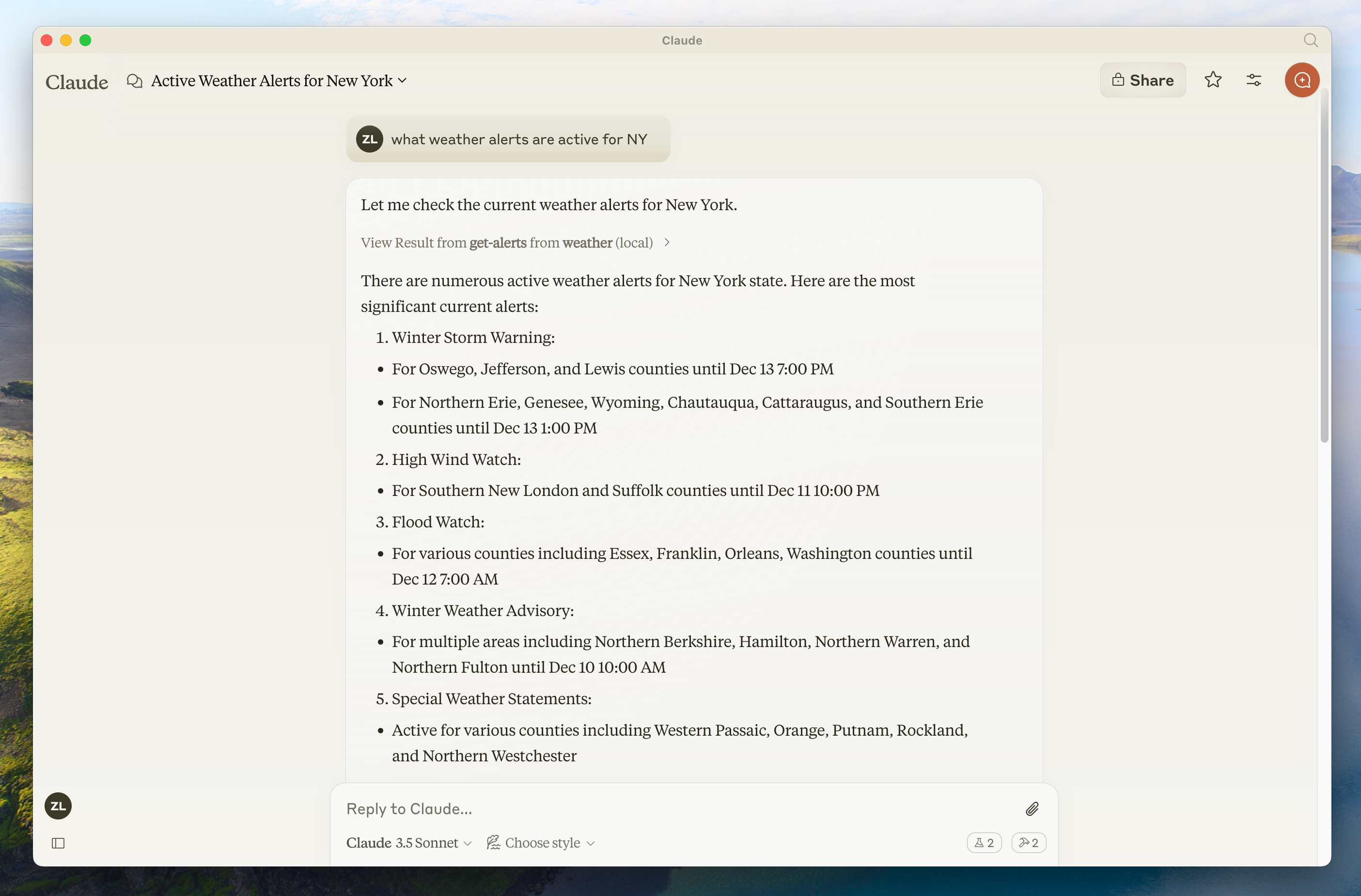
We’ll build a weather server that exposes two tools:
get_alerts: Get weather alerts for US statesget_forecast: Get weather forecast for a location
Why Claude for Desktop and not Claude.ai?
Logging Considerations
STDIO-based servers must never write logs to standard output (stdout). This corrupts JSON-RPC messages.
Use the logging module to write to stderr or files.
# @error: Wrong approach for STDIO
print("Processing request")  # Will corrupt JSON-RPC

# @correct: Right approach for STDIO
import logging
logging.info("Processing request")  # Writes to stderr
Language-Specific Implementations
Python Implementation
Prerequisites
- Python 3.10 or higher
- Python MCP SDK 1.2.0 or higher
- Familiarity with Python and async/await
Environment Setup
Install uv (package manager)
curl -LsSf https://astral.sh/uv/install.sh | shpowershell -ExecutionPolicy ByPass -c "irm https://astral.sh/uv/install.ps1 | iex"Create the project:
# Create project directory
uv init weather
cd weather

# Create and activate virtual environment
uv venv
source .venv/bin/activate  # macOS/Linux
# .venv\Scripts\activate   # Windows

# Install dependencies
uv add "mcp[cli]" httpx

# Create server file
touch weather.py
Server Implementation
Add these imports and constants to weather.py:
from typing import Any
import httpx
from mcp.server.fastmcp import FastMCP

# Initialize FastMCP server
mcp = FastMCP("weather")

# Constants
NWS_API_BASE = "https://api.weather.gov"
USER_AGENT = "weather-app/1.0"
Add helper functions:
async def make_nws_request(url: str) -> dict[str, Any] | None:
    """Make a request to the NWS API with proper error handling."""
    headers = {"User-Agent": USER_AGENT, "Accept": "application/geo+json"}
    async with httpx.AsyncClient() as client:
        try:
            response = await client.get(url, headers=headers, timeout=30.0)
            response.raise_for_status()
            return response.json()
        except Exception:
            return None


def format_alert(feature: dict) -> str:
    """Format an alert feature into a readable string."""
    props = feature["properties"]
    return f"""
Event: {props.get("event", "Unknown")}
Area: {props.get("areaDesc", "Unknown")}
Severity: {props.get("severity", "Unknown")}
Description: {props.get("description", "No description available")}
Instructions: {props.get("instruction", "No specific instructions provided")}
""".strip()
Define the tools:
@mcp.tool()
async def get_alerts(state: str) -> str:
    """Get weather alerts for a US state.

    Args:
        state: Two-letter US state code (e.g. CA, NY)
    """
    url = f"{NWS_API_BASE}/alerts/active/area/{state}"
    data = await make_nws_request(url)

    if not data or "features" not in data:
        return "Unable to fetch alerts or no alerts found."

    if not data["features"]:
        return "No active alerts for this state."

    alerts = [format_alert(feature) for feature in data["features"]]
    return "\n---\n".join(alerts)


@mcp.tool()
async def get_forecast(latitude: float, longitude: float) -> str:
    """Get weather forecast for a location.

    Args:
        latitude: Latitude of the location
        longitude: Longitude of the location
    """
    # Get the forecast grid endpoint
    points_url = f"{NWS_API_BASE}/points/{latitude},{longitude}"
    points_data = await make_nws_request(points_url)

    if not points_data:
        return "Unable to fetch forecast data for this location."

    # Get the forecast URL from the points response
    forecast_url = points_data["properties"]["forecast"]
    forecast_data = await make_nws_request(forecast_url)

    if not forecast_data:
        return "Unable to fetch detailed forecast."

    # Format the periods into a readable forecast
    periods = forecast_data["properties"]["periods"]
    forecasts = []
    for period in periods[:5]:  # Only show next 5 periods
        forecast = f"""
{period["name"]}:
Temperature: {period["temperature"]}°{period["temperatureUnit"]}
Wind: {period["windSpeed"]} {period["windDirection"]}
Forecast: {period["detailedForecast"]}
""".strip()
        forecasts.append(forecast)

    return "\n---\n".join(forecasts)
Run the server:
def main():
    # Initialize and run the server
    mcp.run(transport="stdio")


if __name__ == "__main__":
    main()
Start the server:
uv run weather.pyTypeScript Implementation
Prerequisites
- Node.js 16 or higher
- Familiarity with TypeScript and async/await
Environment Setup
# Create project directory
mkdir weather
cd weather

# Initialize npm project
npm init -y

# Install dependencies
npm install @modelcontextprotocol/sdk zod@3
npm install -D @types/node typescript

# Create src directory
mkdir src
touch src/index.ts
Update package.json:
{
  "type": "module",
  "bin": {
    "weather": "./build/index.js"
  },
  "scripts": {
    "build": "tsc && chmod 755 build/index.js"
  },
  "files": ["build"]
}
Create tsconfig.json:
{
  "compilerOptions": {
    "target": "ES2022",
    "module": "Node16",
    "moduleResolution": "Node16",
    "outDir": "./build",
    "rootDir": "./src",
    "strict": true,
    "esModuleInterop": true,
    "skipLibCheck": true,
    "forceConsistentCasingInFileNames": true
  },
  "include": ["src/**/*"],
  "exclude": ["node_modules"]
}
Server Implementation
Add these to src/index.ts:
import { McpServer } from "@modelcontextprotocol/sdk/server/mcp.js";
import { StdioServerTransport } from "@modelcontextprotocol/sdk/server/stdio.js";
import { z } from "zod";

const NWS_API_BASE = "https://api.weather.gov";
const USER_AGENT = "weather-app/1.0";

// Create server instance
const server = new McpServer({
  name: "weather",
  version: "1.0.0",
});
Add helper functions and interfaces:
// Helper function for making NWS API requests
async function makeNWSRequest<T>(url: string): Promise<T | null> {
  const headers = {
    "User-Agent": USER_AGENT,
    Accept: "application/geo+json",
  };

  try {
    const response = await fetch(url, { headers });
    if (!response.ok) {
      throw new Error(`HTTP error! status: ${response.status}`);
    }
    return (await response.json()) as T;
  } catch (error) {
    console.error("Error making NWS request:", error);
    return null;
  }
}

interface AlertFeature {
  properties: {
    event?: string;
    areaDesc?: string;
    severity?: string;
    status?: string;
    headline?: string;
  };
}

// Format alert data
function formatAlert(feature: AlertFeature): string {
  const props = feature.properties;
  return [
    `Event: ${props.event || "Unknown"}`,
    `Area: ${props.areaDesc || "Unknown"}`,
    `Severity: ${props.severity || "Unknown"}`,
    `Status: ${props.status || "Unknown"}`,
    `Headline: ${props.headline || "No headline"}`,
    "---",
  ].join("\n");
}

interface ForecastPeriod {
  name?: string;
  temperature?: number;
  temperatureUnit?: string;
  windSpeed?: string;
  windDirection?: string;
  shortForecast?: string;
}

interface AlertsResponse {
  features: AlertFeature[];
}

interface PointsResponse {
  properties: {
    forecast?: string;
  };
}

interface ForecastResponse {
  properties: {
    periods: ForecastPeriod[];
  };
}
Register the tools:
// Register weather tools

server.registerTool(
  "get_alerts",
  {
    description: "Get weather alerts for a state",
    inputSchema: {
      state: z
        .string()
        .length(2)
        .describe("Two-letter state code (e.g. CA, NY)"),
    },
  },
  async ({ state }) => {
    const stateCode = state.toUpperCase();
    const alertsUrl = `${NWS_API_BASE}/alerts?area=${stateCode}`;
    const alertsData = await makeNWSRequest<AlertsResponse>(alertsUrl);

    if (!alertsData) {
      return {
        content: [
          {
            type: "text",
            text: "Failed to retrieve alerts data",
          },
        ],
      };
    }

    const features = alertsData.features || [];
    if (features.length === 0) {
      return {
        content: [
          {
            type: "text",
            text: `No active alerts for ${stateCode}`,
          },
        ],
      };
    }

    const formattedAlerts = features.map(formatAlert);
    const alertsText = `Active alerts for ${stateCode}:\n\n${formattedAlerts.join("\n")}`;

    return {
      content: [
        {
          type: "text",
          text: alertsText,
        },
      ],
    };
  },
);

server.registerTool(
  "get_forecast",
  {
    description: "Get weather forecast for a location",
    inputSchema: {
      latitude: z
        .number()
        .min(-90)
        .max(90)
        .describe("Latitude of the location"),
      longitude: z
        .number()
        .min(-180)
        .max(180)
        .describe("Longitude of the location"),
    },
  },
  async ({ latitude, longitude }) => {
    // Get grid point data
    const pointsUrl = `${NWS_API_BASE}/points/${latitude.toFixed(4)},${longitude.toFixed(4)}`;
    const pointsData = await makeNWSRequest<PointsResponse>(pointsUrl);

    if (!pointsData) {
      return {
        content: [
          {
            type: "text",
            text: `Failed to retrieve grid point data for coordinates: ${latitude}, ${longitude}. This location may not be supported by the NWS API (only US locations are supported).`,
          },
        ],
      };
    }

    const forecastUrl = pointsData.properties?.forecast;
    if (!forecastUrl) {
      return {
        content: [
          {
            type: "text",
            text: "Failed to get forecast URL from grid point data",
          },
        ],
      };
    }

    // Get forecast data
    const forecastData = await makeNWSRequest<ForecastResponse>(forecastUrl);
    if (!forecastData) {
      return {
        content: [
          {
            type: "text",
            text: "Failed to retrieve forecast data",
          },
        ],
      };
    }

    const periods = forecastData.properties?.periods || [];
    if (periods.length === 0) {
      return {
        content: [
          {
            type: "text",
            text: "No forecast periods available",
          },
        ],
      };
    }

    // Format forecast periods
    const formattedForecast = periods.map((period: ForecastPeriod) =>
      [
        `${period.name || "Unknown"}:`,
        `Temperature: ${period.temperature || "Unknown"}°${period.temperatureUnit || "F"}`,
        `Wind: ${period.windSpeed || "Unknown"} ${period.windDirection || ""}`,
        `${period.shortForecast || "No forecast available"}`,
        "---",
      ].join("\n"),
    );

    const forecastText = `Forecast for ${latitude}, ${longitude}:\n\n${formattedForecast.join("\n")}`;

    return {
      content: [
        {
          type: "text",
          text: forecastText,
        },
      ],
    };
  },
);
Run the server:
async function main() {
  const transport = new StdioServerTransport();
  await server.connect(transport);
  console.error("Weather MCP Server running on stdio");
}

main().catch((error) => {
  console.error("Fatal error in main():", error);
  process.exit(1);
});
Build and run:
npm run build
node build/index.js
Java Implementation (Spring AI)
Prerequisites
- Java 17 or higher
- Spring Boot 3.3.x or higher
Environment Setup
Use the Spring Initializer to create a new project with these dependencies:
<dependencies>
    <dependency>
        <groupId>org.springframework.ai</groupId>
        <artifactId>spring-ai-starter-mcp-server</artifactId>
    </dependency>
    <dependency>
        <groupId>org.springframework</groupId>
        <artifactId>spring-web</artifactId>
    </dependency>
</dependencies>
Configure application properties:
spring.main.bannerMode=off
logging.pattern.console=
Server Implementation
Create the weather service:
@Service
public class WeatherService {

    private final RestClient restClient;

    public WeatherService() {
        this.restClient = RestClient.builder()
            .baseUrl("https://api.weather.gov")
            .defaultHeader("Accept", "application/geo+json")
            .defaultHeader("User-Agent", "WeatherApiClient/1.0")
            .build();
    }

    @Tool(description = "Get weather forecast for a location")
    public String getWeatherForecast(
        double latitude,
        double longitude
    ) {
        // Returns detailed forecast including temperature, wind, and description
    }

    @Tool(description = "Get weather alerts for a US state")
    public String getAlerts(
        @ToolParam(description = "Two-letter US state code") String state
    ) {
        // Returns active alerts including event type, severity, and instructions
    }
}
Create the main application:
@SpringBootApplication
public class McpServerApplication {

    public static void main(String[] args) {
        SpringApplication.run(McpServerApplication.class, args);
    }

    @Bean
    public ToolCallbackProvider weatherTools(WeatherService weatherService) {
        return MethodToolCallbackProvider.builder()
            .toolObjects(weatherService)
            .build();
    }
}
Build and run:
./mvnw clean install
java -jar target/mcp-weather-stdio-server-0.0.1-SNAPSHOT.jar
Kotlin Implementation
Prerequisites
- Java 17 or higher
- Kotlin compiler
- Gradle
Environment Setup
# Create project
mkdir weather
cd weather
gradle init
Select Application as project type, Kotlin as language, Java 17 as version.
Update build.gradle.kts:
val mcpVersion = "0.4.0"
val ktorVersion = "3.1.1"

dependencies {
    implementation("io.modelcontextprotocol:kotlin-sdk:$mcpVersion")
    implementation("org.slf4j:slf4j-nop:2.0.9")
    implementation("io.ktor:ktor-client-content-negotiation:$ktorVersion")
    implementation("io.ktor:ktor-serialization-kotlinx-json:$ktorVersion")
}

plugins {
    kotlin("plugin.serialization") version "2.1.0"
    id("com.gradleup.shadow") version "8.3.9"
}
Server Implementation
import io.modelcontextprotocol.sdk.*
import io.ktor.client.*
import io.ktor.client.plugins.contentnegotiation.*
import io.ktor.serialization.kotlinx.json.*
import kotlinx.serialization.*
import kotlinx.serialization.json.*

// Create server instance
val server = Server(
    Implementation(name = "weather", version = "1.0.0"),
    ServerOptions(capabilities = ServerCapabilities(tools = ServerCapabilities.Tools(listChanged = true)))
)

// Create HTTP client
val httpClient = HttpClient {
    defaultRequest {
        url("https://api.weather.gov")
        headers {
            append("Accept", "application/geo+json")
            append("User-Agent", "WeatherApiClient/1.0")
        }
    }
    install(ContentNegotiation) { json(Json { ignoreUnknownKeys = true }) }
}

// Register get_alerts tool
server.addTool(
    name = "get_alerts",
    description = "Get weather alerts for a US state. Input is Two-letter US state code (e.g. CA, NY)",
    inputSchema = Tool.Input(
        properties = buildJsonObject {
            putJsonObject("state") {
                put("type", "string")
                put("description", "Two-letter US state code (e.g. CA, NY)")
            }
        },
        required = listOf("state")
    )
) { request ->
    val state = request.arguments["state"]?.jsonPrimitive?.content
    if (state == null) {
        return@addTool CallToolResult(content = listOf(TextContent("The 'state' parameter is required.")))
    }

    // Fetch and format alerts
    CallToolResult(content = alerts.map { TextContent(it) })
}

// Register get_forecast tool
server.addTool(
    name = "get_forecast",
    description = "Get weather forecast for a specific latitude/longitude",
    inputSchema = Tool.Input(
        properties = buildJsonObject {
            putJsonObject("latitude") { put("type", "number") }
            putJsonObject("longitude") { put("type", "number") }
        },
        required = listOf("latitude", "longitude")
    )
) { request ->
    // Fetch and format forecast
    CallToolResult(content = forecast.map { TextContent(it) })
}

// Run server
fun main() = runBlocking {
    val transport = StdioServerTransport(System.`in`.asInput(), System.out.asSink().buffered())
    server.connect(transport)
    server.onClose { /* handle close */ }
}
Build and run:
./gradlew build
java -jar build/libs/weather-0.1.0-all.jar
C# Implementation
Prerequisites
- .NET 8 SDK or higher
- C# development environment
Environment Setup
# Create project
dotnet new console -o weather
cd weather

# Add dependencies
dotnet add package ModelContextProtocol --prerelease
dotnet add package Microsoft.Extensions.Hosting
Server Implementation
Update Program.cs:
using Microsoft.Extensions.DependencyInjection;
using Microsoft.Extensions.Hosting;
using ModelContextProtocol;
using System.Net.Http.Headers;

var builder = Host.CreateEmptyApplicationBuilder(settings: null);

builder.Services.AddMcpServer()
    .WithStdioServerTransport()
    .WithToolsFromAssembly();

builder.Services.AddSingleton(_ =>
{
    var client = new HttpClient() { BaseAddress = new Uri("https://api.weather.gov") };
    client.DefaultRequestHeaders.UserAgent.Add(new ProductInfoHeaderValue("weather-tool", "1.0"));
    return client;
});

var app = builder.Build();
await app.RunAsync();CreateEmptyApplicationBuilder instead of CreateDefaultBuilder to avoid writing additional console output for STDIO transport.Create extension class for JSON handling:
using System.Text.Json;

internal static class HttpClientExt
{
    public static async Task<JsonDocument> ReadJsonDocumentAsync(this HttpClient client, string requestUri)
    {
        using var response = await client.GetAsync(requestUri);
        response.EnsureSuccessStatusCode();
        return await JsonDocument.ParseAsync(await response.Content.ReadAsStreamAsync());
    }
}
Define tool handlers:
using ModelContextProtocol.Server;
using System.ComponentModel;

namespace QuickstartWeatherServer.Tools;

[McpServerToolType]
public static class WeatherTools
{
    [McpServerTool, Description("Get weather alerts for a US state code.")]
    public static async Task<string> GetAlerts(
        HttpClient client,
        [Description("The US state code to get alerts for.")] string state)
    {
        using var jsonDocument = await client.ReadJsonDocumentAsync($"/alerts/active/area/{state}");
        var jsonElement = jsonDocument.RootElement;
        var alerts = jsonElement.GetProperty("features").EnumerateArray();

        if (!alerts.Any())
        {
            return "No active alerts for this state.";
        }

        return string.Join("\n--\n", alerts.Select(alert =>
        {
            JsonElement properties = alert.GetProperty("properties");
            return $"""
                    Event: {properties.GetProperty("event").GetString()}
                    Area: {properties.GetProperty("areaDesc").GetString()}
                    Severity: {properties.GetProperty("severity").GetString()}
                    Description: {properties.GetProperty("description").GetString()}
                    Instruction: {properties.GetProperty("instruction").GetString()}
                    """;
        }));
    }

    [McpServerTool, Description("Get weather forecast for a location.")]
    public static async Task<string> GetForecast(
        HttpClient client,
        [Description("Latitude of the location.")] double latitude,
        [Description("Longitude of the location.")] double longitude)
    {
        var pointUrl = string.Create(CultureInfo.InvariantCulture, $"/points/{latitude},{longitude}");
        using var jsonDocument = await client.ReadJsonDocumentAsync(pointUrl);
        var forecastUrl = jsonDocument.RootElement.GetProperty("properties").GetProperty("forecast").GetString()
            ?? throw new Exception($"No forecast URL provided");

        using var forecastDocument = await client.ReadJsonDocumentAsync(forecastUrl);
        var periods = forecastDocument.RootElement.GetProperty("properties").GetProperty("periods").EnumerateArray();

        return string.Join("\n---\n", periods.Select(period => $"""
                {period.GetProperty("name").GetString()}
                Temperature: {period.GetProperty("temperature").GetInt32()}°F
                Wind: {period.GetProperty("windSpeed").GetString()} {period.GetProperty("windDirection").GetString()}
                Forecast: {period.GetProperty("detailedForecast").GetString()}
                """));
    }
}
Build and run:
dotnet runRust Implementation
Prerequisites
- Rust 1.70 or higher
- Cargo (included with Rust)
Environment Setup
# Install Rust (if not already installed)
curl --proto '=https' --tlsv1.2 -sSf https://sh.rustup.rs | sh

# Create project
cargo new weather
cd weather
Update Cargo.toml:
[package]
name = "weather"
version = "0.1.0"
edition = "2021"

[dependencies]
rmcp = { version = "0.3", features = ["server", "macros", "transport-io"] }
tokio = { version = "1.46", features = ["full"] }
reqwest = { version = "0.12", features = ["json"] }
serde = { version = "1.0", features = ["derive"] }
serde_json = "1.0"
anyhow = "1.0"
tracing = "0.1"
tracing-subscriber = { version = "0.3", features = ["env-filter", "std", "fmt"] }
Server Implementation
Add to src/main.rs:
use anyhow::Result;
use rmcp::{
    ServerHandler, ServiceExt,
    handler::server::{router::tool::ToolRouter, tool::Parameters},
    model::*,
    schemars, tool, tool_handler, tool_router,
};
use serde::Deserialize;
use serde::de::DeserializeOwned;

const NWS_API_BASE: &str = "https://api.weather.gov";
const USER_AGENT: &str = "weather-app/1.0";
Define data structures:
#[derive(Debug, Deserialize)]
struct AlertsResponse {
    features: Vec<AlertFeature>,
}

#[derive(Debug, Deserialize)]
struct AlertFeature {
    properties: AlertProperties,
}

#[derive(Debug, Deserialize)]
struct AlertProperties {
    event: Option<String>,
    #[serde(rename = "areaDesc")]
    area_desc: Option<String>,
    severity: Option<String>,
    description: Option<String>,
    instruction: Option<String>,
}

#[derive(Debug, Deserialize)]
struct PointsResponse {
    properties: PointsProperties,
}

#[derive(Debug, Deserialize)]
struct PointsProperties {
    forecast: String,
}

#[derive(Debug, Deserialize)]
struct ForecastResponse {
    properties: ForecastProperties,
}

#[derive(Debug, Deserialize)]
struct ForecastProperties {
    periods: Vec<ForecastPeriod>,
}

#[derive(Debug, Deserialize)]
struct ForecastPeriod {
    name: String,
    temperature: i32,
    #[serde(rename = "temperatureUnit")]
    temperature_unit: String,
    #[serde(rename = "windSpeed")]
    wind_speed: String,
    #[serde(rename = "windDirection")]
    wind_direction: String,
    #[serde(rename = "detailedForecast")]
    detailed_forecast: String,
}

#[derive(serde::Deserialize, schemars::JsonSchema)]
pub struct MCPForecastRequest {
    latitude: f32,
    longitude: f32,
}

#[derive(serde::Deserialize, schemars::JsonSchema)]
pub struct MCPAlertRequest {
    state: String,
}
Add helper functions:
async fn make_nws_request<T: DeserializeOwned>(url: &str) -> Result<T> {
    let client = reqwest::Client::new();
    let rsp = client
        .get(url)
        .header(reqwest::header::USER_AGENT, USER_AGENT)
        .header(reqwest::header::ACCEPT, "application/geo+json")
        .send()
        .await?
        .error_for_status()?;
    Ok(rsp.json::<T>().await?)
}

fn format_alert(feature: &AlertFeature) -> String {
    let props = &feature.properties;
    format!(
        "Event: {}\nArea: {}\nSeverity: {}\nDescription: {}\nInstructions: {}",
        props.event.as_deref().unwrap_or("Unknown"),
        props.area_desc.as_deref().unwrap_or("Unknown"),
        props.severity.as_deref().unwrap_or("Unknown"),
        props.description.as_deref().unwrap_or("No description available"),
        props.instruction.as_deref().unwrap_or("No specific instructions provided")
    )
}

fn format_period(period: &ForecastPeriod) -> String {
    format!(
        "{}:\nTemperature: {}°{}\nWind: {} {}\nForecast: {}",
        period.name,
        period.temperature,
        period.temperature_unit,
        period.wind_speed,
        period.wind_direction,
        period.detailed_forecast
    )
}
Implement the server:
pub struct Weather {
    tool_router: ToolRouter<Weather>,
}

#[tool_router]
impl Weather {
    fn new() -> Self {
        Self {
            tool_router: Self::tool_router(),
        }
    }

    #[tool(description = "Get weather alerts for a US state.")]
    async fn get_alerts(
        &self,
        Parameters(MCPAlertRequest { state }): Parameters<MCPAlertRequest>,
    ) -> String {
        let url = format!(
            "{}/alerts/active/area/{}",
            NWS_API_BASE,
            state.to_uppercase()
        );

        match make_nws_request::<AlertsResponse>(&url).await {
            Ok(data) => {
                if data.features.is_empty() {
                    "No active alerts for this state.".to_string()
                } else {
                    data.features
                        .iter()
                        .map(format_alert)
                        .collect::<Vec<_>>()
                        .join("\n---\n")
                }
            }
            Err(_) => "Unable to fetch alerts or no alerts found.".to_string(),
        }
    }

    #[tool(description = "Get weather forecast for a location.")]
    async fn get_forecast(
        &self,
        Parameters(MCPForecastRequest {
            latitude,
            longitude,
        }): Parameters<MCPForecastRequest>,
    ) -> String {
        let points_url = format!("{NWS_API_BASE}/points/{latitude},{longitude}");
        let Ok(points_data) = make_nws_request::<PointsResponse>(&points_url).await else {
            return "Unable to fetch forecast data for this location.".to_string();
        };

        let forecast_url = points_data.properties.forecast;

        let Ok(forecast_data) = make_nws_request::<ForecastResponse>(&forecast_url).await else {
            return "Unable to fetch forecast data for this location.".to_string();
        };

        let periods = &forecast_data.properties.periods;
        let forecast_summary: String = periods
            .iter()
            .take(5)
            .map(format_period)
            .collect::<Vec<String>>()
            .join("\n---\n");
        forecast_summary
    }
}

#[tool_handler]
impl ServerHandler for Weather {
    fn get_info(&self) -> ServerInfo {
        ServerInfo {
            capabilities: ServerCapabilities::builder().enable_tools().build(),
            ..Default::default()
        }
    }
}

#[tokio::main]
async fn main() -> Result<()> {
    let transport = (tokio::io::stdin(), tokio::io::stdout());
    let service = Weather::new().serve(transport).await?;
    service.waiting().await?;
    Ok(())
}
Build and run:
cargo build --release
./target/release/weather
Integration with Claude Desktop
Configuration File Locations
| Platform | Configuration File Path |
|---|---|
| macOS | ~/Library/Application Support/Claude/claude_desktop_config.json |
| Windows | %APPDATA%\Claude\claude_desktop_config.json |
Configuration Examples
{
  "mcpServers": {
    "weather": {
      "command": "uv",
      "args": [
        "--directory",
        "/ABSOLUTE/PATH/TO/weather",
        "run",
        "weather.py"
      ]
    }
  }
}
{
"mcpServers": {
"weather": {
"command": "node",
"args": ["/ABSOLUTE/PATH/TO/weather/build/index.js"]
}
}
}{
"mcpServers": {
"spring-ai-mcp-weather": {
"command": "java",
"args": [
"-Dspring.ai.mcp.server.stdio=true",
"-jar",
"/ABSOLUTE/PATH/TO/mcp-weather-stdio-server.jar"
]
}
}
}{
"mcpServers": {
"weather": {
"command": "java",
"args": [
"-jar",
"/ABSOLUTE/PATH/TO/weather/build/libs/weather-0.1.0-all.jar"
]
}
}
}{
"mcpServers": {
"weather": {
"command": "dotnet",
"args": ["run", "--project", "/ABSOLUTE/PATH/TO/PROJECT", "--no-build"]
}
}
}{
"mcpServers": {
"weather": {
"command": "/ABSOLUTE/PATH/TO/weather/target/release/weather"
}
}
}Always use absolute paths. Relative paths may prevent the server from starting.
On Windows, use double backslashes (\) or forward slashes (/) in paths.
Restarting Claude Desktop
After configuration, you must fully restart Claude Desktop:
- macOS: Cmd+Q or select “Quit Claude” from the menu bar
- Windows: Right-click the system tray icon and select “Exit”
Simply closing the window doesn’t fully quit the application.
Testing Your Server
After successful configuration, look for the “Add files, connectors, and more” (+) icon in Claude.
Verification Steps
- Click the + icon
- Hover over “Connectors” menu
- You should see your server listed
Test Queries
- “What’s the weather in Sacramento?”
- “What are the active weather alerts in Texas?”
How It Works
  sequenceDiagram
    participant User
    participant Claude
    participant MCP_Client as MCP Client
    participant MCP_Server as MCP Server
    participant API as NWS API

    User->>Claude: Ask question
    Claude->>MCP_Client: Analyze available tools
    MCP_Client->>MCP_Server: Request tool list
    MCP_Server-->>MCP_Client: Return tool definitions
    Claude->>MCP_Client: Call get_forecast
    MCP_Client->>MCP_Server: Execute tool call
    MCP_Server->>API: Request weather data
    API-->>MCP_Server: Return data
    MCP_Server-->>MCP_Client: Return formatted result
    MCP_Client-->>Claude: Return result
    Claude-->>User: Natural language response
Troubleshooting
Server Not Showing Up
Expand solutions
Checklist:
- Verify configuration file syntax (valid JSON)
- Confirm absolute paths are used
- Fully restart Claude Desktop
- Check log files:
~/Library/Logs/Claude/mcp.log(macOS)
Get Detailed Logs:
# Real-time log monitoring
tail -f ~/Library/Logs/Claude/mcp*.log
Tool Call Failures
Expand solutions
Common Causes:
- Coordinates outside US: NWS API only supports US regions
- Rate limiting: Add delays between requests
- Network issues: Check API accessibility
Debug Steps:
# Add debug logging
logging.basicConfig(level=logging.DEBUG)
Windows Path Issues
Expand solutions
In JSON configuration, Windows paths need double backslashes or forward slashes:
{
  "args": [
    "C:\\Users\\YourName\\weather",  // Correct
    "C:/Users/YourName/weather"      // Also correct
  ]
}