Client Best Practices
A model-free check of the loading mechanics
The token figures in the diagrams on this page (~150,000 vs ~2,000, and ~100K vs ~200 + ~15) are the source article’s illustration, not this site’s measurement. The mechanics themselves can be checked without any model or network: the lab below generates the synthetic catalog, runs the full load, the stepped load and both failure paths, and prints every byte count in the table. It is standard-library Python; its catalog() function is the article’s search_tools step. Save it as tool_load_lab.py and run python3 tool_load_lab.py.
#!/usr/bin/env python3
"""Measure what enters context under full and progressive tool loading.

Generates 40 synthetic tool definitions (8 server prefixes x 5 tools, 3-5 typed
parameters each, unique names), serializes each load the way it would enter a
model's context as compact JSON, and prints the UTF-8 byte counts. Also rehearses
the two failure paths: an unknown search query and an isError result under direct
calling versus a code-mode wrapper. Standard library only; no model, no network.

Usage: python3 tool_load_lab.py
"""
import json

SERVERS = ["weather", "calendar", "mail", "search", "database", "maps", "crm", "logs"]

# Five tools per server, 3-5 typed parameters each. Every server exposes the same
# five actions, so a catalog search for "getLogs" hits one tool per server.
TOOLS = {
    "getLogs": (
        "Read log entries from one {server} source with an optional time window",
        [("source", "string", True), ("since", "string", False), ("limit", "number", False)]),
    "getForecast": (
        "Return the {server} forecast for one location for the next days",
        [("location", "string", True), ("days", "number", False), ("unit", "string", False), ("detailed", "boolean", False)]),
    "listEvents": (
        "List events of the {server} calendar inside a time window",
        [("calendar", "string", True), ("from", "string", False), ("to", "string", False), ("maxResults", "number", False), ("includeDeclined", "boolean", False)]),
    "sendMail": (
        "Send one message through the {server} mail transport",
        [("to", "string", True), ("subject", "string", True), ("body", "string", True)]),
    "searchDocs": (
        "Search the {server} document index and return matching snippets",
        [("query", "string", True), ("scope", "string", False), ("page", "number", False)]),
}


def definitions():
    out = []
    for server in SERVERS:
        for action, (description, params) in TOOLS.items():
            out.append({
                "name": f"{server}_{action}",
                "description": description.format(server=server),
                "inputSchema": {
                    "type": "object",
                    "properties": {name: {"type": typ} for name, typ, _ in params},
                    "required": [name for name, _, req in params if req],
                },
            })
    return out


def catalog(tools, query):
    """The catalog layer: tool name plus a one-line description for each hit."""
    hits = [t for t in tools if query.lower() in t["name"].lower()]
    return [{"name": t["name"], "description": t["description"]} for t in hits]


def detail(tools, name):
    """The detail layer: the full definition of the one tool actually used."""
    return next(t for t in tools if t["name"] == name)


def bytes_of(payload):
    """What enters context: the compact JSON encoding of the payload."""
    return len(json.dumps(payload, separators=(",", ":")).encode())


def main():
    tools = definitions()
    hits = catalog(tools, "getLogs")
    chosen = detail(tools, "database_getLogs")

    print(f"definitions: {len(tools)} (unique names: {len({t['name'] for t in tools})})")
    print(f"full load, one tools array:            {bytes_of(tools):>6} bytes")
    print(f"catalog, search getLogs ({len(hits)} hits):   {bytes_of(hits):>6} bytes")
    print(f"detail, database_getLogs:              {bytes_of(chosen):>6} bytes")
    print(f"catalog + detail:                      {bytes_of(hits) + bytes_of(chosen):>6} bytes")

    # Failure path 1: an unknown query is an empty list, not an error
    unknown = catalog(tools, "zipcar reservation")
    print(f"unknown query 'zipcar reservation':    {bytes_of(unknown):>6} bytes ({len(unknown)} hits)")

    # Failure path 2: one isError result, direct call versus a code-mode wrapper
    result = {"content": [{"type": "text",
                           "text": "rate limit exceeded for source=prod; retry after 30 s"}],
              "isError": True}
    direct = bytes_of(result)  # the whole result object enters context
    wrapper_line = f"ToolError: database_getLogs failed: {result['content'][0]['text']}"
    print(f"isError result, direct call:           {direct:>6} bytes enter context")
    print(f"isError result, code-mode wrapper:     {len(wrapper_line.encode()):>6} bytes (one scriptResult line)")


if __name__ == "__main__":
    main()
One real run (2026-10-31, Python 3.14.7, this site):
| What enters context | Bytes | Share of full load |
|---|---|---|
All 40 definitions, as one tools array | 10,905 | 100% |
Catalog layer only: search_tools("getLogs") returns 8 hits, name + one-line description | 881 | 8.1% |
| Detail layer: the full definition of the one tool actually used | 262 | 2.4% |
| Catalog + detail together | 1,143 | 10.5% |
The two failure paths the lab rehearses:
- Unknown tool:
search_tools("zipcar reservation")returns[](2 bytes, 0 hits), not an error. Return the empty result to the model so it can re-query or fall back; do not guess a tool name on its behalf. isError: truerecovery: with direct calling, the result object itself enters context (107 bytes in the lab); a code-mode wrapper converts the same result into a raised exception, so the script’scatchor its uncaught termination decides which one-linescriptResultreturns to the model (89 bytes here). The wrapper is a host-side pattern from the source article, not a protocol guarantee; the byte difference is small on a single result — the pattern pays off on intermediate results, whose scale this lab does not measure.
Bytes are not tokens; convert with your tokenizer instead of scaling these numbers. The exact byte counts depend on this lab’s generated definitions; rerunning the script reproduces them, and substituting your real tool catalog gives your own numbers.
As MCP host applications, such as agents, connect to more MCP servers and accumulate access to hundreds or thousands of tools, naive approaches to tool management break down. Loading every tool definition into the model’s context window upfront wastes tokens, increases latency, and degrades model performance. Passing large intermediate results through the model between sequential tool calls compounds the problem.
Two patterns address these challenges: progressive discovery, which controls when tool definitions enter context, and programmatic tool calling, which controls how tools are invoked.
Progressive Tool Discovery
Naive MCP host implementations pass the tool definitions of every connected server directly to the model at the start of each conversation. For a handful of tools, this is perfectly reasonable. But when a host has access to dozens of servers exposing hundreds of tools, those definitions alone can consume the majority of the context window before the model has even read the user’s message.
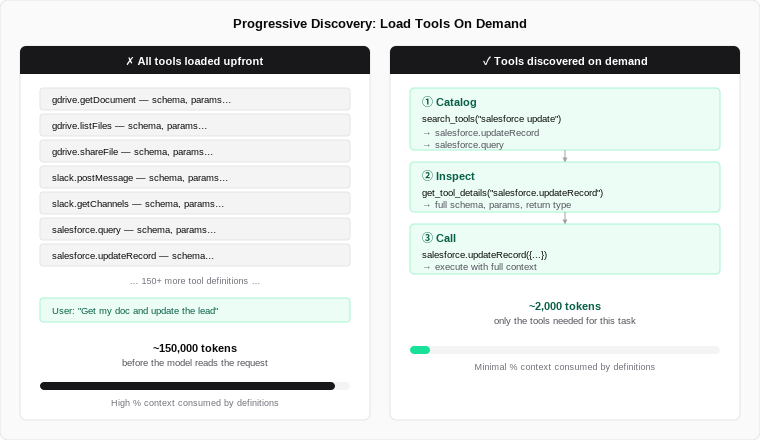
Progressive discovery avoids this:
- The host fetches tool definitions via
tools/listas normal, but defers injecting them into the model’s context. - The host provides a lightweight
search_toolsmeta-tool to the model. - The host loads full definitions into context only as needed.
When to Use Progressive Discovery
Progressive discovery is best used when tool definitions take large parts of the context window. For a small set of tools with tool definitions taking up a small part of the context window, loading all tools is fine. Once the tool definitions take up a significant part of the available context window, clients should switch to progressive discovery. We recommend that clients implement thresholds to determine when to switch:
- Implement a threshold as a percentage of the context window. For example, 1%-5%.
- Load tool definitions. Once the threshold is reached, switch to progressive discovery.
Choosing a Discovery Strategy
Once the model invokes the search_tools tool, we need to choose a search strategy:
- Keyword-based: Keyword matching (BM25, regex). Simple and effective, particularly for descriptive tool names and descriptions.
- Embedding-based: Vector-similarity retrieval over tool descriptions. Handles synonyms and semantic matching better.
- Subagent-based: A secondary model, often a small and fast model such as Claude Haiku or Gemini Flash, selects tools for the task. This usually works very well but can be more costly than embedding-based or keyword-based solutions.
- Hybrid: Combine approaches. For example, by scoring across keyword and embedding rankings, or choosing different strategies depending on use-case or query.
Some model providers already offer built-in tool search. For example, OpenAI and Anthropic support this natively; check your provider’s documentation for an equivalent. When available, you may prefer the platform’s tool search over a custom implementation. Build your own when the provider doesn’t offer one or when you need specialized retrieval logic (e.g., domain-specific ranking or access-control filtering).
The three-layer pattern below illustrates a custom search-based approach in detail, but the layered principle (catalog, inspect, execute) applies regardless of retrieval mechanism.
Using Progressive Discovery
One common implementation for progressive discovery uses a search-based three-layer approach:
Layer 1: Catalog. The host exposes a small set of meta-tools for searching available capabilities. A search_tools tool accepts a natural-language query and returns matching tool names with brief descriptions.
// The model calls a lightweight search tool
search_tools({ query: "update salesforce record" })

// Returns concise matches: names and one-line descriptions only
→ [
    { name: "salesforce_updateRecord", description: "Update fields on a Salesforce object" },
    { name: "salesforce_upsertRecord", description: "Insert or update based on external ID" }
  ]
Layer 2: Inspect. Once the model identifies a candidate, it fetches the full definition (input schema, output schema, documentation) for that tool only.
// The model inspects only the tool it needs
get_tool_details({ name: "salesforce_updateRecord" });
This returns the complete schema for a single tool:
{
  "name": "salesforce_updateRecord",
  "description": "Updates a record in Salesforce",
  "inputSchema": {
    "type": "object",
    "properties": {
      "objectType": {
        "type": "string",
        "description": "Salesforce object type"
      },
      "recordId": { "type": "string", "description": "Record ID to update" },
      "data": { "type": "object", "description": "Fields to update" }
    },
    "required": ["objectType", "recordId", "data"]
  }
}
Layer 3: Execute. The model calls the tool with full knowledge of its interface, having loaded only the definitions it needed.
This pattern reduces token usage dramatically and can improve tool selection accuracy: the model focuses on a few relevant tools rather than scanning hundreds of irrelevant ones. Other discovery strategies (embeddings, subagents, etc.) follow the same layered principle but substitute different retrieval mechanisms in the catalog layer.
Dynamic Server Management
Progressive discovery extends beyond individual tools to entire servers. Rather than connecting to every configured server at startup, a host can:
- Maintain a registry of available servers and their high-level descriptions.
- Connect to a server only when the model determines it needs that server’s capabilities.
- Disconnect servers that are no longer relevant to the current task, freeing context.
  sequenceDiagram
    participant Model
    participant Host
    participant Registry
    participant Server

    Model->>Host: search_available_servers("CRM")
    Host->>Registry: Query available servers
    Registry-->>Host: Salesforce server (not connected)
    Host-->>Model: Salesforce server available

    Model->>Host: enable_server("salesforce")
    Host->>Server: server/discover
    Server-->>Host: Supported versions + capabilities
    Host->>Server: tools/list
    Server-->>Host: Tool definitions
    Host-->>Model: Salesforce server connected

    Note over Model: Task complete

    Model->>Host: disable_server("salesforce")
    Host-->>Model: Server disconnected, context freed
This works especially well for general-purpose agents, where the user’s intent isn’t known upfront. The agent starts with a minimal set of always-on servers and connects others as needed. Combined with agent skills, a skill file can declare which MCP servers it needs, and the host connects them only when that skill is invoked.
Implementation Guidelines
When implementing progressive discovery:
| Guideline | Rationale |
|---|---|
| Offer multiple detail levels | Let the model choose between name-only, name-and-description, or full-schema responses. |
| Cache tool definitions | Once fetched from a server, memoize the definition host-side so re-injecting it later doesn’t need another tools/list round trip. This is separate from what’s currently in the model’s context. |
Refresh on list_changed | Re-index the search catalog when a server sends notifications/tools/list_changed. |
| Group tools by server | Present tools organized by their source server so the model can reason about related capabilities. |
Caching
Each list result (such as tools/list), as well as each server/discover and
resources/read result, carries ttlMs and cacheScope hints. Follow them as defined in the
specification’s caching utility. In particular,
treat a cached list as stale once a list_changed notification arrives, even before its TTL
expires.
Interaction with Prompt Caching
Most providers cache the prompt prefix, including the tools array. Adding or removing tool
definitions mid-conversation invalidates that cache, and the resulting miss can cost more tokens
than the definitions you removed. To preserve caching:
- Append newly discovered definitions after the cache breakpoint rather than re-sorting the
toolsarray, or route every call through a single stablecall_tool({name, args})meta-tool so the array never changes. - Treat server disconnection as a conversation-boundary operation rather than a per-turn one.
- Consult your provider’s caching documentation alongside the tool-search links above.
Programmatic Tool Calling / Code Mode
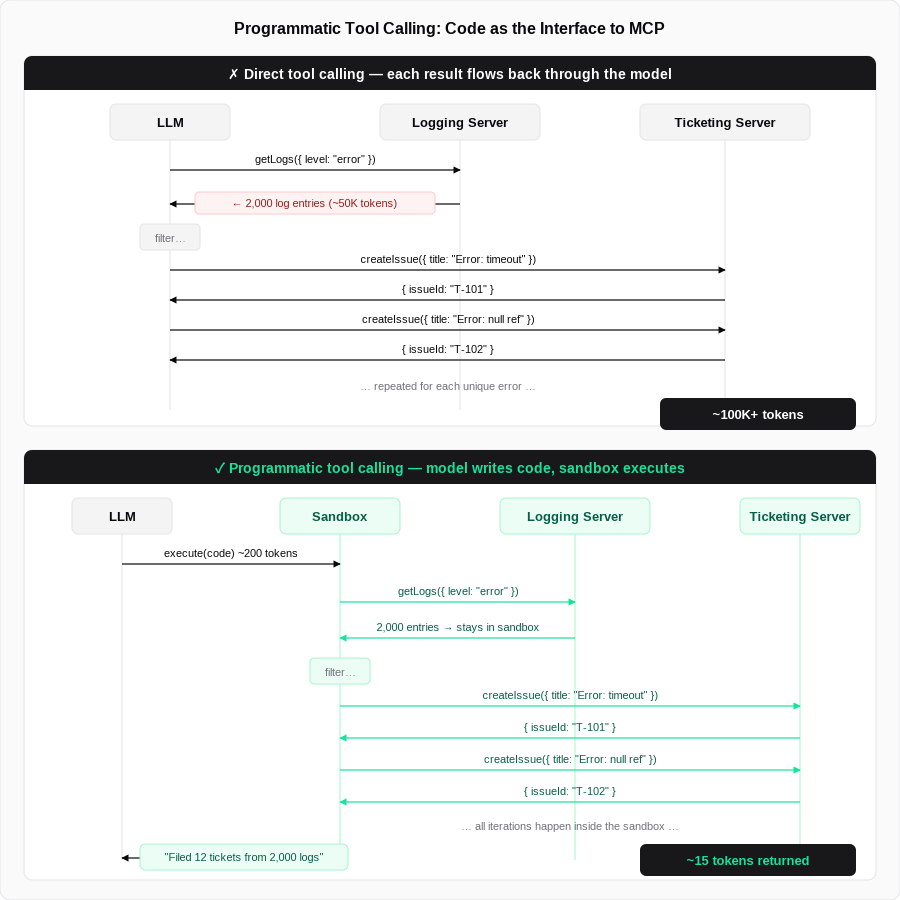
With direct tool calling, every tool invocation is a round trip: the model generates a tool call, the client executes it, and the full result flows back into the model’s context. When a task requires chaining multiple tools (read a document, transform it, write it somewhere else), each intermediate result passes through the model, consuming tokens and adding latency even when it has nothing to do with them.
Programmatic tool calling (sometimes called “code mode”) provides a way for clients to compose tool calls effectively. Instead of calling tools directly, the model writes code that calls tools. The code executes in a sandboxed environment, and only the final result returns to the model.
Programmatic tool calling is powerful and allows for more efficient use of MCP tools and resources, but requires clients to implement a sandbox environment.
How It Works
The host converts MCP tool schemas into a typed API available inside a sandbox. When the model needs tools, it writes a script and executes it.
Step 1: Generate a programmatic API from MCP schemas. The host reads each server’s tool definitions and produces typed functions based on each tool’s arguments and outputSchema:
// Auto-generated from the Logging MCP server's tool schema
interface LogEntry {
  timestamp: string;
  message: string;
  level: string;
}

function logging_getLogs(input: {
  level: "error" | "warn" | "info";
  since: number;
}): Promise<{ entries: LogEntry[] }> {
  return mcp.callTool<{ entries: LogEntry[] }>("logging_getLogs", input);
}

// Auto-generated from the Ticketing MCP server's tool schema
function ticketing_createIssue(input: {
  title: string;
  body?: string;
  priority: "low" | "medium" | "high";
}): Promise<{ issueId: string }> {
  return mcp.callTool<{ issueId: string }>("ticketing_createIssue", input);
}
MCP Servers can provide an optional outputSchema for each tool. When an output schema is present, the host can produce precise return types (like LogEntry above).
When an output schema is absent, prefer the simple path:
- Use a generic type and move on. Accept
anyorstringand handle the unstructured output downstream. The real fix is for server authors to provideoutputSchema. - Extract a typed result using a fast model, for single-shot calls outside loops. Expose a host-brokered
extract(value, ExpectedType)helper through the same stub-interception path as MCP tool calls so the sandbox itself never opens a network connection. The helper routes to a small model (for example, Claude Haiku or Gemini Flash) to coerce the value intoExpectedType. This adds per-call latency and can hallucinate or drop fields, so validate the result againstExpectedTypebefore use.
Step 2: The model writes code against these APIs. Rather than making separate tool calls with full results flowing through context between them, the model writes a single script. Consider a task like “find all error logs from the past hour and file a ticket for each unique error.” With direct tool calling, thousands of log entries would flow through the model’s context. With code, the model filters in the sandbox:
// Model-generated code, executes in sandbox
const logs = await logging_getLogs({
  level: "error",
  since: Date.now() - 3600000,
});

// Filter and deduplicate inside the sandbox, not in the model's context
const uniqueErrors = new Map<string, LogEntry>();
for (const log of logs.entries) {
  if (!uniqueErrors.has(log.message)) {
    uniqueErrors.set(log.message, log);
  }
}

for (const [message, log] of uniqueErrors) {
  await ticketing_createIssue({
    title: `Error: ${message}`,
    body: `First seen: ${log.timestamp}\nOccurrences: ${
      logs.entries.filter((l) => l.message === message).length
    }`,
    priority: "high",
  });
}

console.log(
  `Filed ${uniqueErrors.size} tickets from ${logs.entries.length} error logs`,
);
Step 3: The sandbox executes the code. Function calls inside the sandbox are intercepted and routed back to the appropriate MCP server through the host broker. The log data and ticket creation flow directly between servers without ever entering the model’s context. Only the console.log output, a single summary line, returns to the model.
Choosing a Sandbox
The right sandbox depends on the language you want the model to write, your host application’s language, and how much isolation you need. The table lists example runtimes rather than endorsements; evaluate maturity for your use case:
| Sandboxed language | Runtime / Library | Host language | Approach |
|---|---|---|---|
| JavaScript | Deno, isolated-vm | Rust / Node / CLI | V8-based runtimes with fine-grained permissions. Can disable all permissions for full lockdown. |
| Python | Monty (experimental) | Rust | Minimal Python interpreter built for AI use cases. No I/O by default. |
| TypeScript | pctx (early-stage) | Python / Rust | Incorporates code mode concepts as a library, with low-level Rust support. |
| Any (via Wasm) | Wasmtime | Rust / C / Go | Compile any language to Wasm and run it with capability-based security. |
Regardless of sandbox, the integration pattern is the same: the host injects function stubs, intercepts calls over an in-process or stdio channel (so network permissions can stay fully denied), and dispatches them as tools/call requests to MCP servers.
Execution Architecture
The implementation has three components:
  flowchart LR
    subgraph Host["MCP Host"]
        A[LLM] -->|writes code| B[Sandbox]
        B -->|function call| C[MCP Client]
        C -->|return value| B
        B -->|console output| A
    end
    C -->|tool call| D[MCP Server A]
    C -->|tool call| E[MCP Server B]
    D -->|result| C
    E -->|result| C
The sandbox runs model-generated code in an isolated environment with no direct network access. Its only interface to the outside world is through the generated function stubs, which route calls back to the host.
The host acts as a broker. It receives function calls from the sandbox, maps them to the correct MCP server, executes the tool call, and returns the result to the sandbox. Authorization tokens and credentials are held by the host and never exposed to the generated code.
The model sees only what the sandbox returns, typically the output of console.log statements or a final return value. This gives the model (and the client developer) precise control over what enters the context window.
Security Considerations
Programmatic tool calling introduces a code execution surface that requires careful sandboxing:
- Per-call authorization: The broker is still the MCP host for spec purposes. Apply the same human-in-the-loop confirmation policy to sandbox-originated calls that you apply to direct calls (see Tools: Security). Approving the script does not grant blanket approval for every tool call it makes at runtime; hosts may grant categorical approval (for example, “allow
ticketing_createIssuefor this script run”) rather than prompting per iteration, but the broker must still evaluate each call against that grant. - Cross-server data flow: Tool results from one server are untrusted input to another. The broker should apply the same input-review policy to brokered calls as to direct ones; output truncation alone does not prevent exfiltration.
- Network isolation: The sandbox should have no direct network access. All external communication flows through the host broker, which enforces authorization and access control.
- No credential exposure: API keys and tokens are held by the host. The generated code calls typed functions; the host adds authentication when forwarding to servers.
- Resource limits: Set timeouts and memory limits on sandbox execution to prevent runaway scripts.
- Output filtering: Validate and truncate sandbox console output before feeding it back to the model.
Error Handling
MCP tool errors arrive as a successful response with
isError: true rather than a transport
failure. Generated wrappers should convert this into a thrown exception so model-authored code
can use try/catch. If an uncaught error terminates the script, surface it as the script’s
result so the model can self-correct; the model is responsible for reporting any partial side
effects already committed.
Combining Both Patterns
Progressive discovery and programmatic tool calling work well together. The model uses discovery tools to identify which tools it needs, loads their schemas, and then writes a single script that calls multiple tools in one execution pass. This combination minimizes both the token cost of tool definitions and the token cost of tool results, keeping the model’s context focused on reasoning rather than passing data through it.