Understanding MCP: The USB‑C Interface for AI Agents
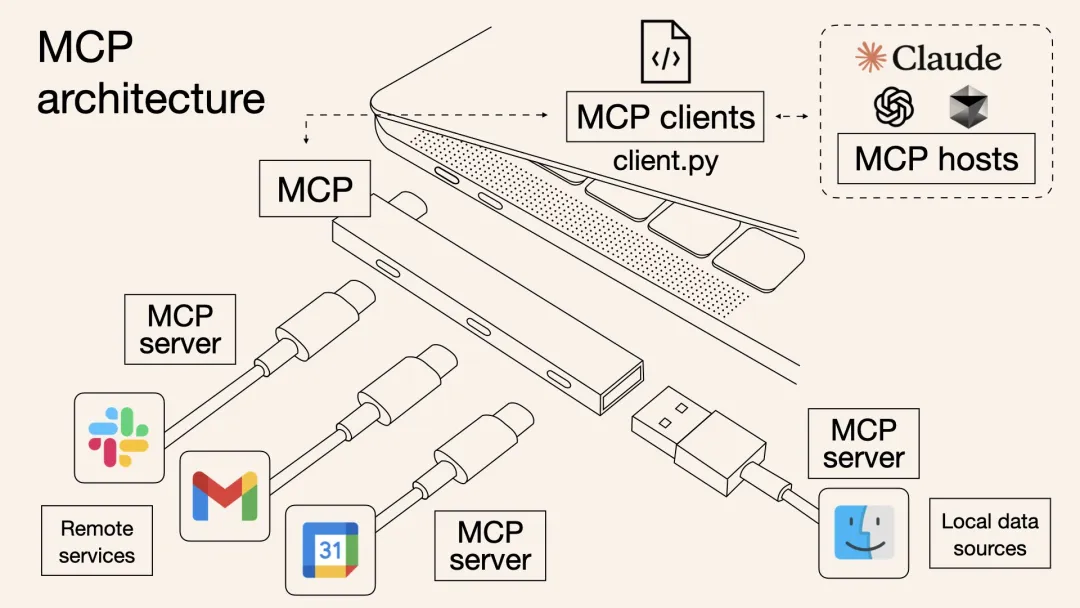
As AI reshapes the media industry value chain, the effectiveness of content creation, distribution, and audience reach is moving from isolated efficiency gains to algorithm-driven, end-to-end intelligent collaboration. However, data silos at scale and “stovepiped” integrations across platforms remain major bottlenecks for bringing existing systems and data assets into AI workflows.
This article breaks down MCP from technical architecture to real-world scenarios, and explains how a next-generation interface standard—“connect once, use everywhere”—can unlock the value of data assets by making integration simpler, safer, and more reusable.
(Written by @bexzhang, revised by @osli. Source: Tencent Cloud Smart Media.)
1. The origins of MCP
Background and pain points
As AI applications move into more complex, production environments, integrating models with external data and tools often becomes “stovepiped development” (each model must be integrated with each data source separately). This drives up cost, increases security risk, and makes systems hard to extend. On the enterprise side, sensitive data and long change-management processes slow down integration; on the technical side, there has been a lack of an open, widely agreed-upon standard protocol.
Some frameworks support agent development, such as LangChain Tools, LlamaIndex, and the Vercel AI SDK. But they still require substantial custom code and can be difficult to scale across teams and environments.
The LangChain and LlamaIndex ecosystems can feel fragmented, and their abstractions may become painful as business logic grows more complex. The Vercel AI SDK is well-abstracted for front-end UI integrations and certain AI features, but it is tightly coupled to Next.js and less flexible across other frameworks and languages.
Release and goals
Proposed by Anthropic (the company behind Claude), MCP was released and open-sourced in late November 2024: https://www.anthropic.com/news/model-context-protocol
The core goal is to create a standardized protocol—analogous to USB‑C—that unifies how AI models interact with external resources. The idea is “integrate once, run anywhere”: enabling AI applications to securely access and operate on local and remote data without each integration becoming bespoke plumbing.
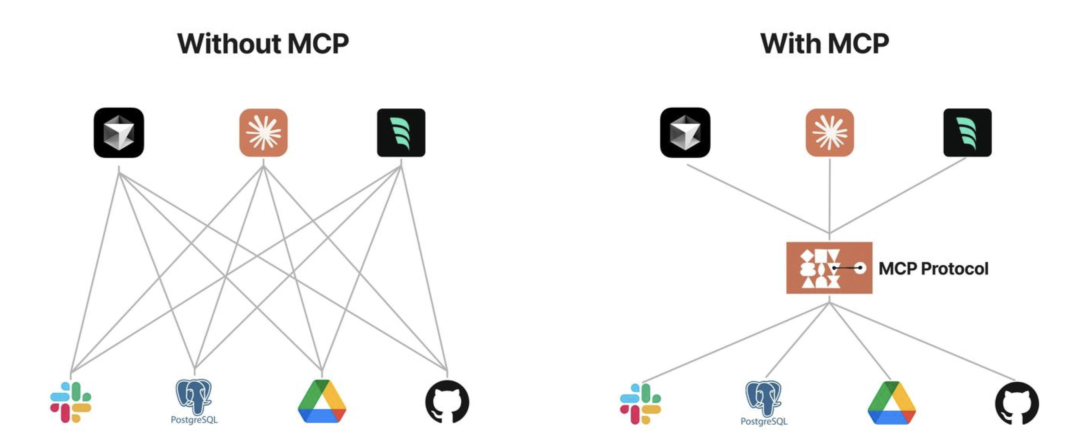
Technical evolution timeline:
| Time | Stage | Key events |
|---|---|---|
| Before 2023 | Early stage | Each AI app implemented its own function-calling integrations |
| 2023 | Exploration | Frameworks like LangChain attempted to generalize tool calling |
| Nov 2024 | Protocol release | Anthropic open-sourced MCP 1.0 |
| 2025 Q1 | Ecosystem growth | 200+ third-party MCP server implementations appeared on GitHub |
2. Concepts and advantages
What MCP is
MCP is an open protocol that standardizes how AI models interact with external data sources and tools. At a high level, it provides:
- A unified “translator” layer that turns different APIs into standardized requests a model/client can understand.
- A secure connectivity layer for accessing local and remote resources—without forcing sensitive data to be uploaded to the cloud.
Some argue that an industry-wide standard like this would have been easiest to establish if a dominant player had pushed it early. Instead, MCP emerged via Anthropic’s open-source effort and broader community alignment.
Intuitive analogies
The “universal remote” analogy
Imagine every enterprise system is a different brand of smart appliance (TV, AC, speakers). Traditionally, each appliance needs its own remote (a custom integration). MCP is like a universal remote with the protocols built in: an AI assistant can “press buttons” through a single, standardized interface—without hunting down a different remote for each device.
The “USB‑C for AI” analogy
MCP is often compared to a USB‑C port for AI. Different assistants are like different devices; in the past, each device needed a different cable for each peripheral. MCP provides a single interface so an AI system can “plug into” many different tools and data sources with the same connector—reducing bespoke APIs and scripts the way USB‑C reduces dongles and cable chaos.
Key advantages
MCP (Model Context Protocol) is designed for LLM applications and targets common pain points like data silos and tool integration:
- Ecosystem: A growing ecosystem of ready-to-use servers/tools that can be reused.
- Consistency: Not tied to a single model vendor; any client/model stack that supports MCP can adopt it.
- Data security: You can design and constrain what data is exposed through servers and what operations are allowed.
MCP vs. function calling
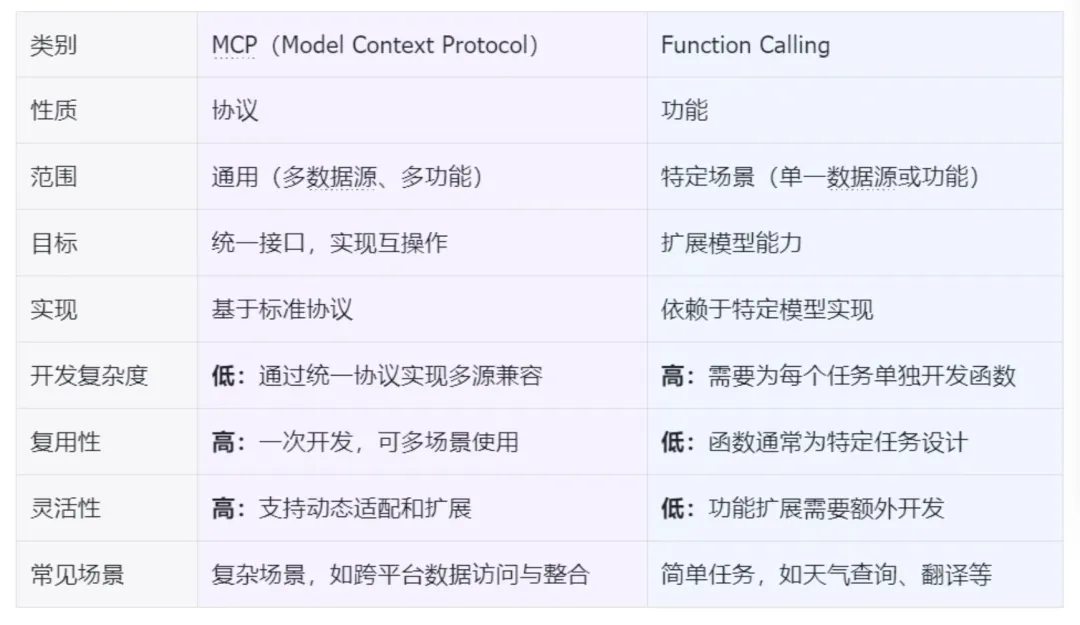
MCP and function calling both aim to improve model interactions with external tools and data, but MCP emphasizes a standardized protocol surface and a broader set of interaction primitives (not just “call a function”). In practice:
- MCP defines multiple primitives (Prompts/Resources/Tools) to express intent, while traditional function calling is often treated as a single tool-call mechanism.
- MCP requires explicit protocol support across clients/servers and an agreed wire format; function calling also depends on model feature support, but does not standardize end-to-end integration across systems by itself.
3. Core principles and technical architecture
Core architecture
MCP uses a client–server architecture. It separates communication between LLM hosts and external resources into clients and servers. Clients send requests to MCP servers, and servers forward those requests to the relevant resources. This layering helps control access and ensures only authorized resources are accessed.
Official architecture diagram:
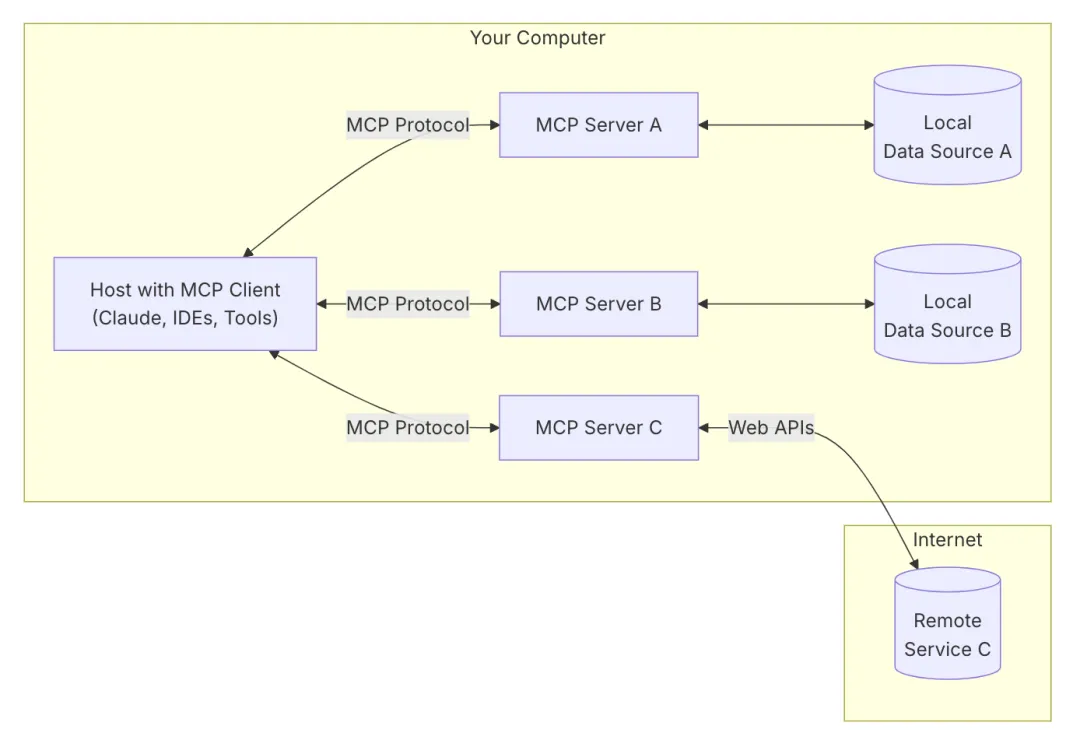
- MCP Host: The host application that initiates the connection (for example Cursor, Claude Desktop, Cline).
- MCP Client: Maintains a 1:1 connection to a server inside the host. A host can run multiple MCP clients to connect to multiple servers.
- MCP Server: A lightweight, independently running program that provides context, tools, and prompts via the protocol.
- Local data sources: Local files, databases, and APIs.
- Remote services: External files, databases, and APIs.
This modular design makes it easy to add or remove integrations without rewriting the host, decouples model logic from underlying systems, and enables richer interaction patterns while maintaining human-in-the-loop safety.
Workflow
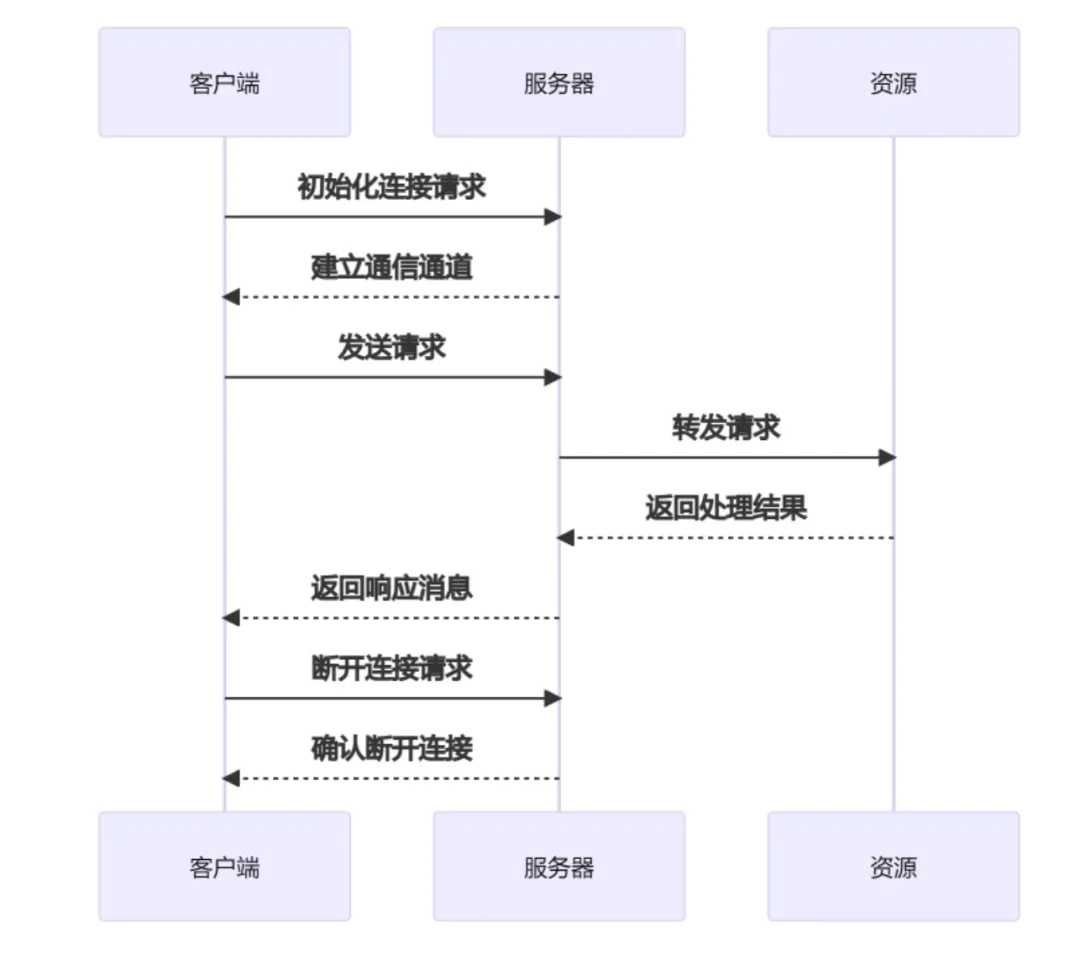
- Initialize connection: the client connects to the server and establishes a channel.
- Send request: the client builds a request message and sends it to the server.
- Process request: the server parses the request and performs the operation (query a database, read a file, etc.).
- Return result: the server returns a response message to the client.
- Disconnect: the client closes the connection or the server times out.
Communication model
MCP defines a JSON-RPC 2.0–based messaging protocol. Key traits include:
- Flexible transports: Supports STDIO (local, via process pipes) and SSE + HTTP POST (network), while allowing custom transports.
- Transparent messages: Uses JSON for requests (unique ID), responses (result/error), and notifications (no reply).
- Developer-friendly: Human-readable messages and structured logging make debugging easier than many binary protocols.
Primitives: MCP distinguishes multiple primitives to clearly express intent:
Servers can provide:
- Prompts: Pre-written prompt templates that can be inserted into the model input to guide behavior.
- Resources: Structured data/document content that can be read and provided as context (similar to read-only files).
- Tools: Executable operations/functions the model can request. Because tools can have side effects, execution typically requires user approval.
Clients can additionally provide:
- Roots: Authorized entry points to local file systems or directories, constraining what servers can access.
- Sampling: A mechanism where servers can ask the client’s model to generate text mid-workflow, enabling more agent-like multi-step flows (to be used cautiously with human oversight).
This separation makes context management more structured and transparent: both the model and the user can distinguish “reference material” from “actions,” and apply appropriate approvals and monitoring.
4. MCP server categories and applications
MCP servers are the core of the ecosystem. Below is a practical categorization: official, third-party, and community servers.
1) Official MCP servers
(Maintained by the MCP core team, providing reference implementations and best practices.)
Core infrastructure
- modelcontextprotocol/server-filesystem (filesystem): Standardized file access with fine-grained permissions. https://github.com/modelcontextprotocol/servers/tree/main/src/filesystem
Extended tools
- modelcontextprotocol/Google Drive (cloud files): Google Drive integration for listing, reading, and searching files. https://github.com/modelcontextprotocol/servers/tree/main/src/gdrive
AI-enhanced tools
- modelcontextprotocol/aws-kb-retrieval-server (vector retrieval): An official vector retrieval server for similarity search. https://github.com/modelcontextprotocol/servers/tree/main/src/aws-kb-retrieval-server
2) Third-party MCP servers
(Maintained by professional vendors/teams, often with deep vertical integrations.)
Databases
- Tinybird MCP Server (real-time analytics): Low-latency SQL querying optimized for time-series data. https://github.com/tinybirdco/mcp-tinybir
Cloud services
- Qdrant MCP Server (vector search): Enterprise vector search with hybrid search and distributed deployment. https://github.com/qdrant/mcp-server-qdrant/
AI services
- LlamaCloud Server (model hosting): Multimodal model calls plus fine-tuning and inference monitoring. https://github.com/run-llama/mcp-server-llamacloud
Developer tools
- Neo4j (graph database): Cypher queries and knowledge graph workflows. https://github.com/neo4j-contrib/mcp-neo4j/
Web tooling
- Firecrawl (web crawling): Scrape, crawl, search, extract, deep research, and batch crawling. https://github.com/mendableai/firecrawl-mcp-server?tab=readme-ov-file#firecrawl-mcp-server
3) Community MCP servers
(Built by the broader community for long-tail and experimental needs.)
Local tools
- punkpeye/mcp-obsidian (knowledge management): Obsidian vault sync and Markdown parsing improvements. https://github.com/punkpeye/mcp-obsidian
Automation
- appcypher/mcp-playwright (browser automation): Playwright-powered automation with dynamic JS execution. https://github.com/appcypher/awesome-mcp-servers#browser-automation
Vertical applications
- r-huijts/mcp-aoai-web (art data access): Natural-language access to Rijksmuseum collections and metadata. https://github.com/r-huijts/rijksmuseum-mcp
Developer utilities
- sammcj/mcp-package-version (dependency management): Query npm/pypi versions to reduce “hallucinated” version advice. https://github.com/sammcj/mcp-package-version
Privacy-enhancing
- hannesrudolph/mcp-ragdocs (local RAG): Private document retrieval using local vector stores. https://github.com/hannesrudolph/mcp-ragdocs
4) Comparison
| Dimension | Official servers | Third-party servers | Community servers |
|---|---|---|---|
| Maintenance | Long-term, steady releases | Depends on vendor support cycles | Depends on individual/community activity |
| Spec compatibility | High alignment with latest MCP spec | Usually covers core spec | May include experimental extensions |
| Security review | Often officially reviewed | Some vendors provide audits | No mandatory audit |
| Deployment complexity | Standard packages and docs | Vendor-specific credentials/config | Often requires manual debugging |
| Typical use cases | Foundations and key business scenarios | Deep vertical/industry needs | Personalization and experimentation |
Additional note: remote MCP connections
Some readers may assume “Remote MCP Connections” are already implemented based on transport discussions in the official docs. In practice, many client/server setups still run locally; remote connectivity often requires a local server to bridge to a remote service.
The official 2025 roadmap discusses this direction: https://modelcontextprotocol.io/development/roadmap
Remote MCP Connections are described as a top priority, enabling clients to securely connect to MCP servers over the internet. Key initiatives include:
- Authentication & authorization: Standardized auth, with a focus on OAuth 2.0.
- Service discovery: How clients discover and connect to remote MCP servers.
- Stateless operations: Exploring serverless-friendly operation patterns where possible.
References:
[1]https://www.anthropic.com/news/model-context-protocol
[2]https://modelcontextprotocol.io/development/roadmap
[3]https://github.com/modelcontextprotocol
[4]https://mcp.so/servers
[5]https://github.com/punkpeye/awesome-mcp-servers
[6]https://github.com/appcypher/awesome-mcp-servers
[7]https://github.com/modelcontextprotocol/python-sdk
[8]https://github.com/punkpeye/awesome-mcp-servers?tab=readme-ov-file#frameworks
[9]https://mp.weixin.qq.com/s/Toj2TudFNXx6_Z11zSRb2g